
How Odoo Inventory Helps Growing Businesses Improve Stock Visibility and Operations
Learn how the Odoo Inventory module helps growing businesses improve stock visibility, warehouse workflows, reordering, fulfillment, and operational reporting.

Inventory problems usually show up as everyday friction before they show up as a major business issue. A customer asks whether an item is available. A sales team promises a delivery date. A warehouse team discovers the count is wrong. Purchasing realizes too late that a fast-moving item has fallen below the reorder point. Finance asks why inventory value does not match what the operations team expects.
For growing businesses, these gaps are rarely caused by one person or one department. They often happen because inventory is being managed across disconnected tools, spreadsheets, manual updates, and systems that do not share information quickly enough.
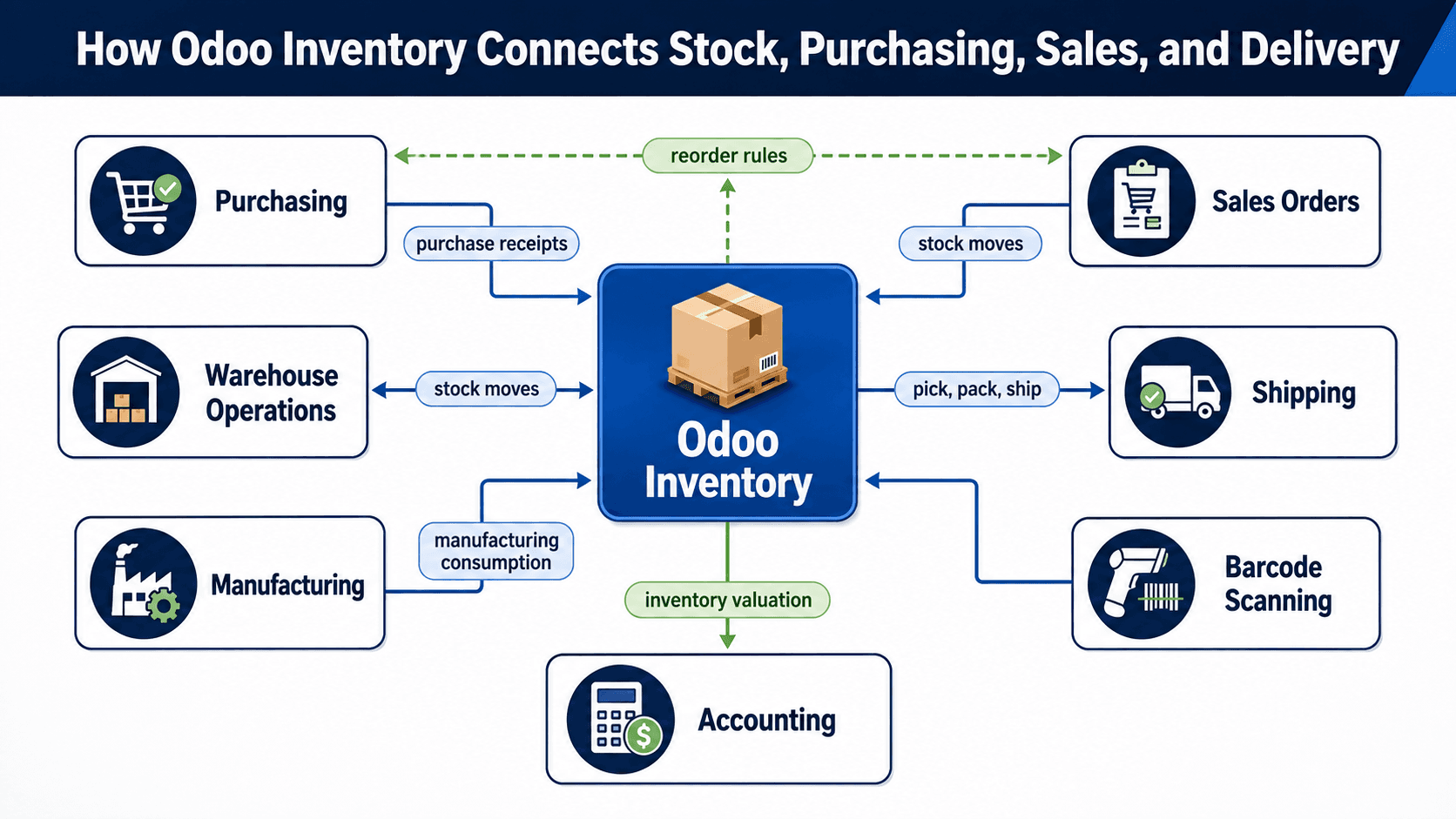
The Odoo Inventory module helps businesses bring stock, warehouse operations, purchasing, sales, manufacturing, shipping, and reporting into a more connected workflow. This article explains what Odoo Inventory does, where it helps most, and how it can support better decisions as a business grows.
What the Odoo Inventory Module Does
Odoo Inventory is the inventory and warehouse management module within the Odoo ERP platform. It helps businesses track products, stock quantities, warehouse locations, receipts, transfers, deliveries, reorder rules, lot or serial numbers, and stock movements from one connected system.
Instead of treating inventory as a separate spreadsheet or standalone warehouse tool, Odoo Inventory connects stock activity with the rest of the business. Sales orders can reserve stock. Purchase orders can replenish inventory. Manufacturing teams can consume raw materials. Delivery teams can prepare shipments. Accounting can receive cleaner inventory valuation data.
That connection matters because inventory is not only a warehouse concern. It affects cash flow, customer delivery promises, purchasing decisions, production planning, sales confidence, and leadership reporting.
Why Inventory Visibility Becomes Hard as a Business Grows
Many companies start with a simple process. A small team knows what is on the shelf, what has been ordered, and which customers are waiting. But growth changes the operating reality. More products, more locations, more suppliers, more sales channels, and more team members create more places for information to drift.
Once the business reaches that stage, a spreadsheet may still show inventory numbers, but it does not always show what is available, reserved, incoming, damaged, transferred, or already promised to a customer. The result is uncertainty at the exact moment teams need confidence.
- Sales teams may quote availability without knowing what has already been reserved.
- Warehouse teams may pick from the wrong location or discover count differences during fulfillment.
- Purchasing teams may reorder too early, too late, or without seeing true demand.
- Finance teams may spend extra time reconciling inventory value against operational records.
- Leadership may lack a reliable view of stock turns, shortages, slow-moving items, and fulfillment delays.
How Odoo Inventory Helps the Business
Odoo Inventory helps by making inventory activity more visible, structured, and connected. The exact setup depends on the business model, but the benefits usually fall into a few practical areas.
1. Better Stock Visibility Across Locations
Odoo Inventory can track stock by warehouse, location, product, lot, serial number, package, and movement. This gives teams a clearer view of what is physically available, what is reserved, what is incoming, and what needs attention.
For companies with multiple storage areas, vehicles, showrooms, job sites, or warehouses, this visibility can reduce confusion and improve daily planning. The goal is not just to know a total quantity. The goal is to know where inventory is, what status it is in, and whether it can actually be used for a customer order or internal need.
2. Faster Receiving, Picking, Packing, and Shipping
Warehouse work becomes more dependable when the process is guided by clear transfers and stock moves. Odoo Inventory supports receipts, internal transfers, delivery orders, picking routes, packing workflows, and shipping-related operations. With barcode workflows, teams can also reduce manual entry and confirm movements more accurately.
This helps businesses reduce delays between order confirmation and fulfillment. It also gives managers a better way to see where work is getting stuck, whether in receiving, putaway, picking, packing, or shipment preparation.
3. Smarter Reordering and Purchasing
A growing business needs to avoid both stockouts and excess inventory. Odoo Inventory can support reorder rules, minimum and maximum stock levels, lead times, and purchasing workflows. When configured properly, the system helps teams identify what needs to be replenished before the shortage becomes urgent.
This does not remove the need for human judgment. Demand changes, supplier reliability, seasonality, and cash flow still matter. But it gives purchasing teams better signals and reduces dependence on manual spreadsheet checks.
4. Stronger Sales and Customer Commitments
Inventory visibility affects the customer experience. When sales and operations are working from the same system, it becomes easier to make realistic promises about product availability, delivery timing, substitutions, backorders, and fulfillment status.
This can be especially useful for businesses that sell through multiple channels or manage both standard products and made-to-order work. Odoo helps connect the promise made to the customer with the inventory and operational steps required to fulfill it.
5. Cleaner Reporting for Operations and Finance
Inventory has financial consequences. Overstock ties up cash. Stockouts can delay revenue. Poor tracking can create write-offs, reconciliation issues, and margin confusion. Because Odoo Inventory connects with purchasing, sales, manufacturing, and accounting workflows, it can support cleaner operational and financial reporting.
Leaders can use that reporting to identify slow-moving products, recurring shortages, fulfillment bottlenecks, supplier delays, and inventory trends that deserve attention.
Where Odoo Inventory Is Especially Useful
Odoo Inventory can support many types of businesses, but it is especially relevant when inventory is central to customer delivery, production, or cash flow.
- Manufacturing companies that need visibility into raw materials, components, finished goods, and production-related stock movement.
- Warehousing and distribution teams that manage receiving, putaway, picking, packing, shipping, and transfers.
- Wholesale businesses that need to manage supplier lead times, stock availability, and customer order fulfillment.
- Multi-location businesses that need a shared view of inventory across warehouses, branches, or operating sites.
- Companies replacing spreadsheets or disconnected tools with a more connected ERP workflow.
What to Consider Before Implementing Odoo Inventory
The value of Odoo Inventory depends on more than turning on the module. The implementation should begin with the way the business actually buys, stores, moves, sells, produces, and reports on inventory.
- Product data: SKUs, categories, units of measure, variants, barcodes, lots, serial numbers, and product descriptions should be cleaned before migration.
- Warehouse structure: Locations, routes, picking methods, and transfer rules should reflect how work happens in the real operation.
- Replenishment logic: Minimum quantities, lead times, preferred vendors, and reorder rules should be mapped carefully.
- Process ownership: Sales, purchasing, warehouse, finance, and leadership teams should agree on what the system should control and what each team owns.
- Training and adoption: Users need practical training for the workflows they perform every day, not only a broad software overview.
How eBusiness Solutions Can Help
eBusiness Solutions helps growing businesses plan, implement, customize, integrate, and support Odoo ERP. For inventory-focused projects, that means understanding the current process first, then configuring Odoo Inventory around practical business needs such as stock visibility, warehouse movement, purchasing, order fulfillment, reporting, and system integration.
The right implementation should reduce confusion, not add another layer of complexity. eBusiness Solutions brings functional and technical experience to help businesses connect Odoo Inventory with the broader ERP workflow, including sales, purchasing, manufacturing, accounting, and reporting.
Final Takeaway
Inventory is one of the clearest places where operational systems either help a business scale or hold it back. When stock information is spread across disconnected tools, teams spend too much time checking, correcting, and reconciling. When inventory is connected to sales, purchasing, warehouse operations, manufacturing, and finance, the business can make faster and more reliable decisions.
Odoo Inventory gives growing businesses a practical way to improve stock visibility, organize warehouse workflows, strengthen purchasing decisions, and support better customer commitments. For companies that are outgrowing spreadsheets or standalone tools, it can be an important step toward a more connected ERP foundation.
If your team is evaluating Odoo Inventory or planning a broader Odoo ERP implementation, eBusiness Solutions can help map the right rollout path and identify where the module can create the most operational value.
Ready to explore Odoo ERP?
Talk with eBusiness Solutions about Odoo implementation, customization, migration, integration, and long-term support.
Book an Odoo ERP ConsultationFrequently Asked Questions
What is Odoo Inventory used for?
Odoo Inventory is used to manage stock levels, warehouse locations, receipts, internal transfers, deliveries, reorder rules, lot and serial tracking, and inventory movement across the business.
Can Odoo Inventory help replace spreadsheets?
Yes. Odoo Inventory can help reduce spreadsheet dependency by giving teams a connected system for inventory quantities, movements, reservations, replenishment, and fulfillment workflows.
Does Odoo Inventory work with purchasing and sales?
Yes. Odoo Inventory connects with Odoo purchasing and sales workflows so stock can be replenished, reserved, moved, and delivered as part of a broader ERP process.
Is Odoo Inventory useful for manufacturing businesses?
Yes. Manufacturing businesses can use Odoo Inventory to track raw materials, components, finished goods, warehouse locations, and stock movements connected to production workflows.
Can Odoo Inventory support barcode workflows?
Yes. Odoo Inventory can support barcode workflows for receiving, picking, transfers, inventory adjustments, and related warehouse movements when configured for the business process.
Related Articles

Odoo ERP for Multi Location Service Businesses
See how a connected Odoo ERP setup can give multi-location service businesses clearer customer, scheduling, invoicing, and reporting workflows.

What to Know Before Moving Multiple Companies to Odoo
Learn what to share, what to keep separate, and how to plan an Odoo multi-company rollout around the way your businesses work.

How Odoo 19 AI Helps Teams Work Faster Without Losing Human Control
Learn how Odoo 19 AI can help operations, finance, and customer-facing teams work faster while people retain control of business decisions.