
How Odoo 19 AI Helps Teams Work Faster Without Losing Human Control
Learn how Odoo 19 AI can help operations, finance, and customer-facing teams work faster while people retain control of business decisions.

AI is becoming part of everyday business software. The question for operations, finance, and IT leaders is no longer whether teams will use AI. It is whether they can use it in a way that makes work faster without weakening accountability, process discipline, or data control.
Odoo 19 introduces AI capabilities designed to work inside the business system your team already uses. Rather than forcing people to move between separate tools and copy context from one place to another, Odoo AI can help users ask questions, summarize information, improve written communication, and support defined workflows from within the database.
That creates real potential for mid-sized teams. But the value does not come from automating everything. It comes from choosing the right work for AI support, keeping people responsible for final decisions, and building clear rules around data, permissions, and review.
What does AI in Odoo 19 do
Odoo 19 includes an Ask AI experience that can provide context-aware help from within the database. A user can ask for assistance, open relevant views, improve content, or receive guidance without leaving the system. Odoo also supports AI-assisted writing in rich-text areas such as email drafts, templates, descriptions, notes, and knowledge articles.
For teams handling large volumes of incoming documents or customer requests, Odoo AI can also support document classification and routing, ticket summaries, suggested actions, and structured information extracted from unstructured text. AI is most useful when it reduces low-value effort around a real business workflow. It should make information easier to find, understand, prepare, or route. It should not become an unchecked decision-maker.
Four practical ways teams can start
Help employees find the right information faster
Many operational delays are not caused by missing data. They are caused by people spending too long looking for it. An operations manager may need to understand the status of a late order. A finance lead may need context before following up on an exception. A sales representative may need to review the latest activity on a customer record. AI can help users get oriented faster when it works with the context already held in Odoo.
- What is the current status of this order, project, or customer issue?
- What happened in this discussion before I joined it?
- Which record or report should I review next?
The goal is not to replace analysis. It is to reduce the time required to reach the point where a qualified person can make an informed decision.
Improve everyday communication without losing the human voice
Teams lose time drafting routine updates, customer replies, internal notes, and knowledge-base content. Odoo AI can help create a first draft, summarize a discussion, rewrite text for clarity, or adjust tone. A service manager can turn a long ticket thread into a concise internal summary before deciding how to respond. A sales team can prepare a follow-up message faster, then revise it based on the customer relationship and commercial context.
Treat AI output as a draft, not an approved communication. The person responsible for the message should still review it for accuracy, tone, pricing, commitments, and sensitive information before it is sent.
Route documents and requests more consistently
Finance and operations teams often spend considerable time handling incoming invoices, contracts, forms, and requests. Odoo AI document automation can classify documents, extract relevant information, and route them into the correct process or folder. This can reduce manual sorting and create more consistent intake while making it easier to see which documents are waiting, where exceptions sit, and which items require a person's attention.
The best first use case is a narrow, high-volume workflow with clear categories and a known exception path. Vendor invoices, customer onboarding documents, quality records, and service requests are common examples. Define the review step before you automate the intake step.
Support service teams with better context
Customer-facing teams need quick access to history, product information, and the next sensible action. Odoo AI can support helpdesk workflows by summarizing incoming requests, helping categorize tickets, and using approved knowledge sources to draft helpful responses. A team member should remain responsible for customer commitments, unusual cases, priority changes, and any answer involving policy, pricing, or contractual obligations.
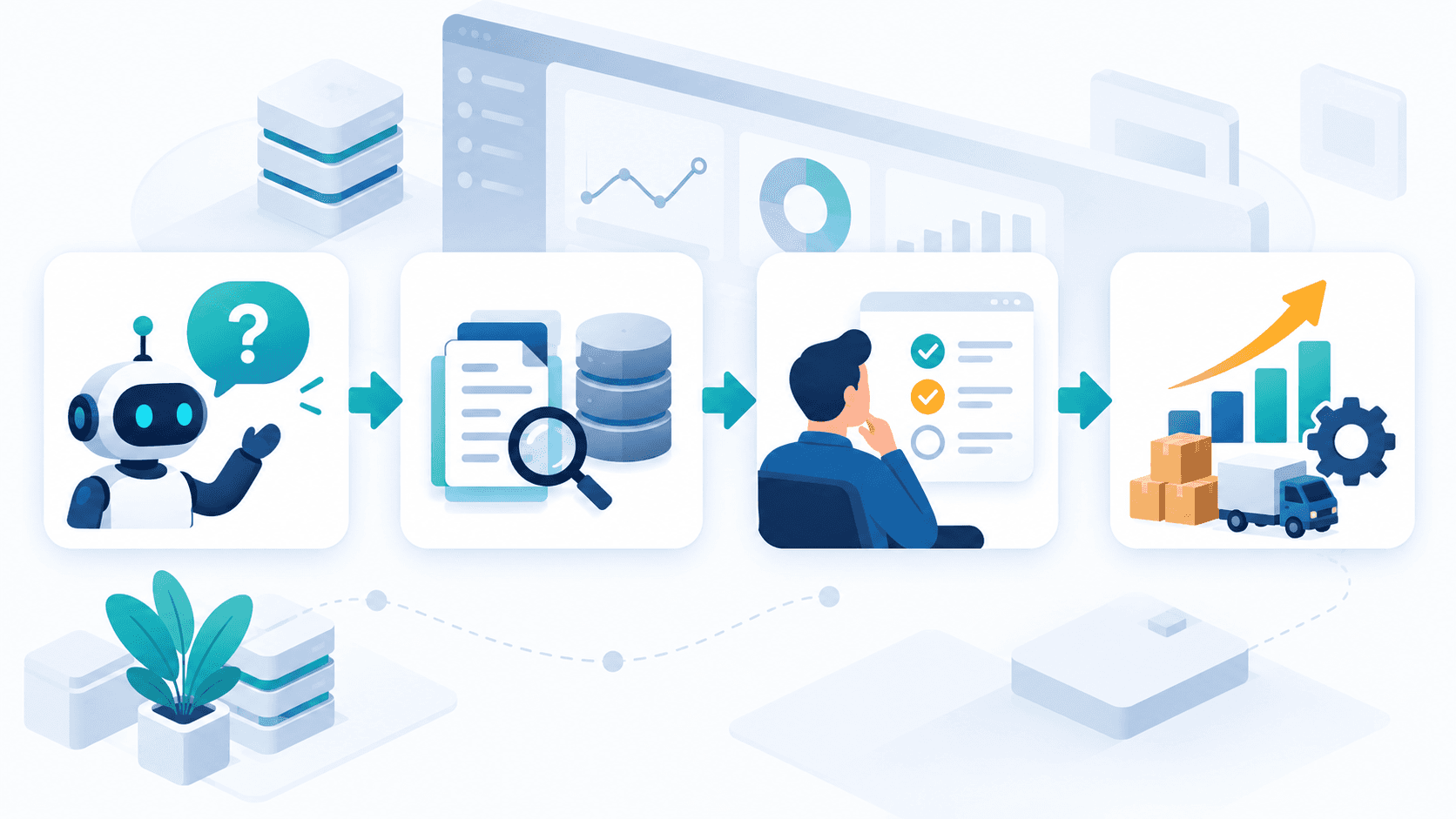
The operating model AI assists people decide
The most reliable AI-enabled ERP model is straightforward. AI prepares or organizes information by summarizing, drafting, classifying, or identifying the next relevant item. A responsible employee then reviews the output for context, accuracy, and business impact. Finally, the business process records the decision so approvals, ownership, and auditability remain inside the ERP workflow.
This model is particularly important for finance approvals, inventory adjustments, customer commitments, supplier changes, and any operational action that affects revenue, cost, compliance, or service levels. Rather than asking only what can be automated, ask which decisions need better preparation and which decisions must remain clearly owned by a person.
How to choose a first Odoo AI use case
Choose a first workflow that is frequent, contained, and measurable. Avoid beginning with a broad transformation initiative or a customer-facing process where errors could create immediate risk.
- It has a clear owner.
- It uses data already available in Odoo.
- Its inputs and exception cases are understood.
- A human review point is defined.
- You can measure the result, such as time saved, response time, rework, or backlog reduction.
For many mid-sized companies, a good first pilot is document intake, ticket summarization, internal knowledge support, or communication drafting. These uses are practical, visible to staff, and easier to improve before expanding into more complex workflows.
Implementation considerations before you switch it on
AI features should be configured as part of an implementation plan, not treated as a standalone add-on. Confirm which teams and roles should have access, which data and knowledge sources are appropriate for each use case, what AI is allowed to assist with, where human approval is required, how exceptions and feedback will be handled, and which results will define success after 30, 60, and 90 days.
Standard AI assistance can surface information and help users, while customized agents and actions need their own configuration and controls. The more an AI-enabled workflow can affect business records or customer outcomes, the more deliberately it should be designed, tested, and governed.
Make Odoo AI a practical advantage
The businesses that gain the most from AI will not be the ones that chase every feature. They will be the ones that use AI to remove friction from a well-defined process while keeping accountability where it belongs. For operations, that may mean faster access to order context. For finance, it could mean quicker document intake and clearer exception handling. For customer support, it could mean better-prepared agents and more consistent responses.
eBusiness Solutions helps organizations map practical ERP workflows, configure Odoo around real operating needs, and introduce automation with sensible controls. If you are considering Odoo 19 AI, start with a focused workflow assessment rather than a broad technology experiment.
Ready to explore Odoo ERP?
Talk with eBusiness Solutions about Odoo implementation, customization, migration, integration, and long-term support.
Book an Odoo ERP ConsultationFrequently Asked Questions
Can Odoo AI make changes to my database on its own?
Standard Ask AI is designed to assist users with information, navigation, and content support; it does not itself create leads or alter records. Custom agents and AI-enabled actions require dedicated configuration, permissions, and controls.
Which Odoo teams benefit first from AI?
Operations, finance, sales, customer support, and internal knowledge teams often benefit first because they handle recurring requests, documents, discussions, and communications that can be better organized or drafted with AI support.
Should we use AI for finance approvals or customer commitments?
AI can prepare information, highlight context, and draft communications, but a responsible employee should retain final approval for financial, contractual, and customer-impacting decisions.
Do we need a full Odoo reimplementation to use AI features?
Not necessarily. The right path depends on your current Odoo version, configuration, data quality, permissions, and the workflow you want to improve. A focused assessment can identify whether a contained pilot is appropriate.
Related Articles

Odoo ERP for Multi Location Service Businesses
See how a connected Odoo ERP setup can give multi-location service businesses clearer customer, scheduling, invoicing, and reporting workflows.

What to Know Before Moving Multiple Companies to Odoo
Learn what to share, what to keep separate, and how to plan an Odoo multi-company rollout around the way your businesses work.

Odoo ERP Implementation Timeline: A Phase-by-Phase Planning Guide for Mid-Sized Teams
Understand the typical Odoo ERP implementation phases, from discovery and scope through migration, training, go-live, and continuous improvement.