
What to Know Before Moving Multiple Companies to Odoo
Learn what to share, what to keep separate, and how to plan an Odoo multi-company rollout around the way your businesses work.

You ask a simple question: How are the businesses doing this month? One company’s numbers are ready. Another is still checking invoices. Someone sends a spreadsheet, then emails a newer version twenty minutes later.
Each business has its own way of working. The difficulty starts when you need to see them together. For an owner or CFO overseeing several companies, even a routine review can turn into a request for more files.
Odoo multi-company lets you manage multiple businesses within one database. Before moving, decide how those businesses should work together: which records they share, who can access each company, and what the group actually needs to see. Those answers shape an implementation your teams can live with after launch.
When the work between companies becomes the problem
Imagine a group with a distribution business and a separate service company. Both buy from some of the same suppliers. Their finance teams work in different systems, and a manager keeps a separate file to track charges between them.
That arrangement may be manageable for a while. Then someone changes a supplier address in one system. An invoice goes to the wrong business. At month-end, two people spend an afternoon explaining why the balances do not agree.
Before looking at software, ask your team where this happens today. Pick a recent example and trace it from the first request to the final report. Who entered the information? Who copied it? Where did someone need to call a colleague to understand it? A clear example gives an implementation partner something useful to solve.
Start with your company structure
Several brands or offices do not automatically mean you need a separate Odoo company for each one. A business with two warehouses may need a warehouse setup. Separate legal businesses with their own books present a different design question.
Bring a simple company map to the first planning conversation. Include legal entities, trading names, locations, accounting systems, and the people responsible for each business. Mark where companies buy from or provide services to one another.
Ask your finance lead and implementation partner to review that map together. Odoo branches inherit accounting settings from a parent company, so a branch should be a deliberate choice rather than a convenient label for another office.
Decide what to share and what to keep separate
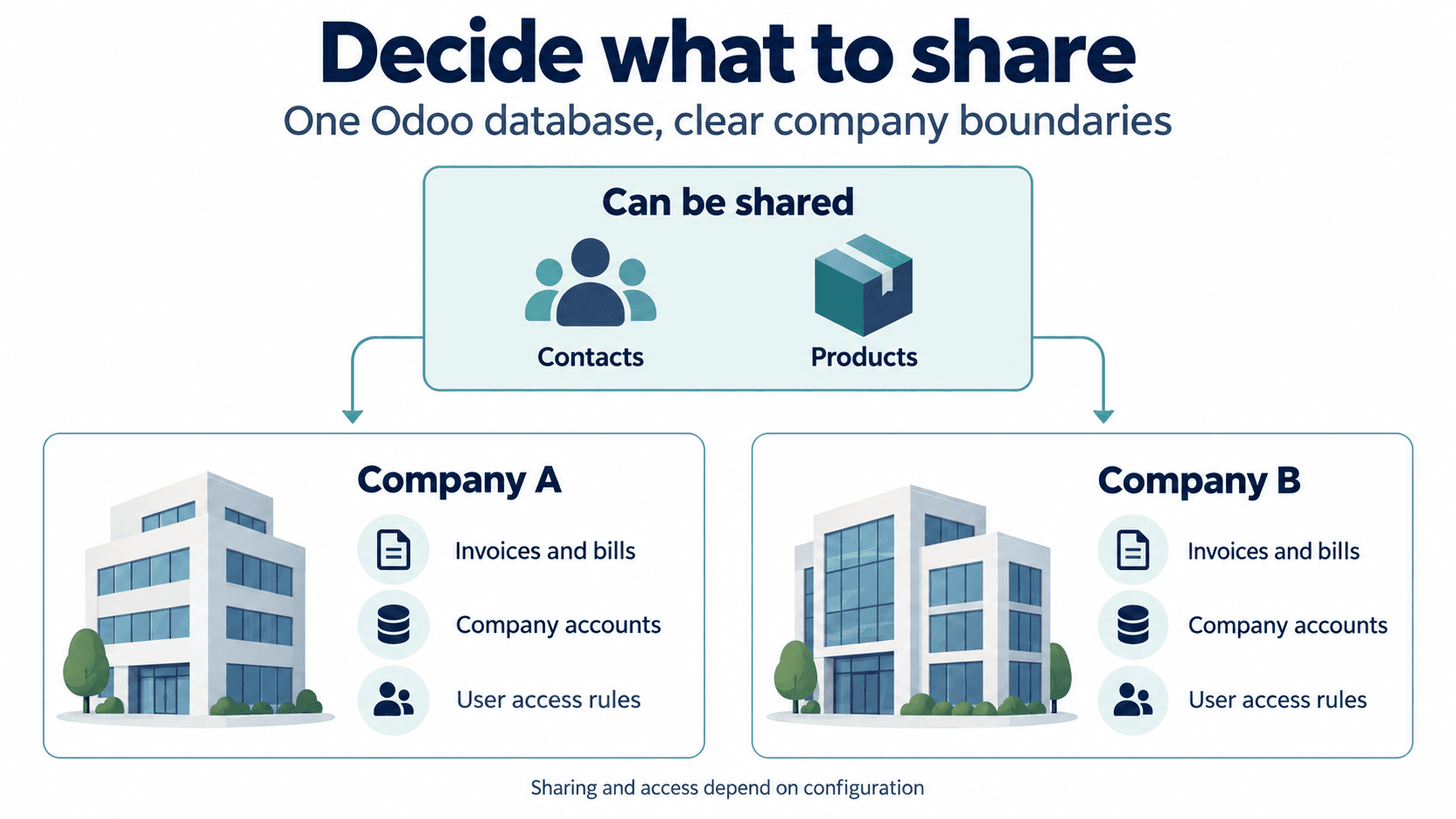
In Odoo, contacts and products can be shared across companies, while invoices and vendor bills belong to a specific company. Access can be limited to the companies a user needs. A shared database does not mean unrestricted access.
The business decisions behind those settings deserve attention. If two companies use the same supplier, who owns the main contact record? If someone changes it, who checks that the change is appropriate for both teams? Work through examples of duplicate records with finance, operations, and the people who maintain customer and product data.
Be specific about access, too. A group controller may need to work across the businesses. Someone processing purchases for one company may have no reason to open another company’s records. Test both situations with ordinary user accounts before launch.
Test a transaction between two sister companies
Consider an illustrative example: Company A provides a maintenance service to Company B and invoices it. Company A needs to record the sale; Company B needs to record the purchase. With the appropriate configuration, Odoo can create a corresponding vendor bill when an intercompany invoice is posted.
Before automating this, walk through a real example with both finance teams. Ask to see the correction as well as the original invoice during testing. A tidy demonstration of one successful transaction tells you less than watching your team resolve an exception.
- Who authorizes the charge, and how is the price agreed?
- Which records should be created automatically, and which need review?
- What should happen if the service is disputed or a credit is issued?
- Who follows up when the two companies’ records do not agree?
For groups with shared inventory, add the physical movement of goods to this exercise. Confirm who owns the stock at each stage and how the receiving team records it. Do not assume a service example covers warehouse operations.
Agree on the reports before building them
One view of the group can mean different things to different people. An owner may want a sales comparison. Operations may need outstanding orders by company. Finance may need a group report with a defined treatment of transactions between the businesses.
Take an existing management report into discovery. Mark the columns that matter and explain the decisions people make from it. Ask your partner to demonstrate the proposed result using sample data from more than one company.
For formal consolidated reporting, have finance specify the required adjustments and intercompany treatment. Ask the partner to demonstrate how these will be handled, and agree who signs off the numbers. Selecting several companies on a screen is not sufficient evidence.
Plan a first rollout your team can manage
Choose the initial scope around a business problem you can test. You might begin with a limited set of finance and purchasing workflows, then expand once users can complete them reliably. If the first phase includes transactions between companies, include both sides in the pilot.
Give each business an owner for data preparation and testing. Resolve duplicate records and agree which open transactions must carry forward. Decide how staff will retrieve older records when a customer or supplier calls.
Allow time for everyday practice. Have users enter a transaction in the correct company and correct an error. Include the person who covers their work when they are away. Confirm subscription requirements as part of the plan: Odoo’s multi-company capability requires its Custom plan rather than Standard, subject to Odoo’s current terms.
Bring your company map to the first conversation
You do not need a finished specification to start. Bring your company map, a report that takes too long to prepare, and one example of work that passes between businesses. Those give the discussion a practical starting point.
eBusiness Solutions helps businesses plan, configure, migrate, and train teams for Odoo ERP. Based in Columbus, Ohio, we work with businesses across the United States. Tell us how your companies work together, and we will help you assess what an Odoo rollout would need to cover.
Ready to explore Odoo ERP?
Talk with eBusiness Solutions about Odoo implementation, customization, migration, integration, and long-term support.
Book an Odoo ERP ConsultationFrequently Asked Questions
Can Odoo manage multiple companies in one database?
Yes. Odoo supports multiple companies in one database. Records can be shared or restricted by company, and users can be given access to the companies they need for their role.
Should every brand or location be a separate Odoo company?
Not necessarily. The right structure depends on legal entities, accounting requirements, operational separation, reporting needs, and how the businesses work together. Warehouses, branches, and companies have different uses.
Can Odoo automate transactions between companies?
Odoo can be configured to create counterpart documents for intercompany transactions. The businesses still need clear rules for approval, pricing, exceptions, and reconciliation before automation is enabled.
What should we prepare before an Odoo multi-company implementation?
Prepare a company map, identify shared and company-specific data, document transactions between companies, bring current management reports, and involve finance and operations owners in data preparation and testing.
Related Articles

Odoo ERP for Multi Location Service Businesses
See how a connected Odoo ERP setup can give multi-location service businesses clearer customer, scheduling, invoicing, and reporting workflows.

How Odoo 19 AI Helps Teams Work Faster Without Losing Human Control
Learn how Odoo 19 AI can help operations, finance, and customer-facing teams work faster while people retain control of business decisions.

Odoo ERP Implementation Timeline: A Phase-by-Phase Planning Guide for Mid-Sized Teams
Understand the typical Odoo ERP implementation phases, from discovery and scope through migration, training, go-live, and continuous improvement.