
ERP Integration vs. Consolidation: When to Connect Systems and When to Create One System of Record
Learn when businesses should integrate systems and when they should consolidate core workflows into one ERP system of record to reduce data silos and long-term complexity.
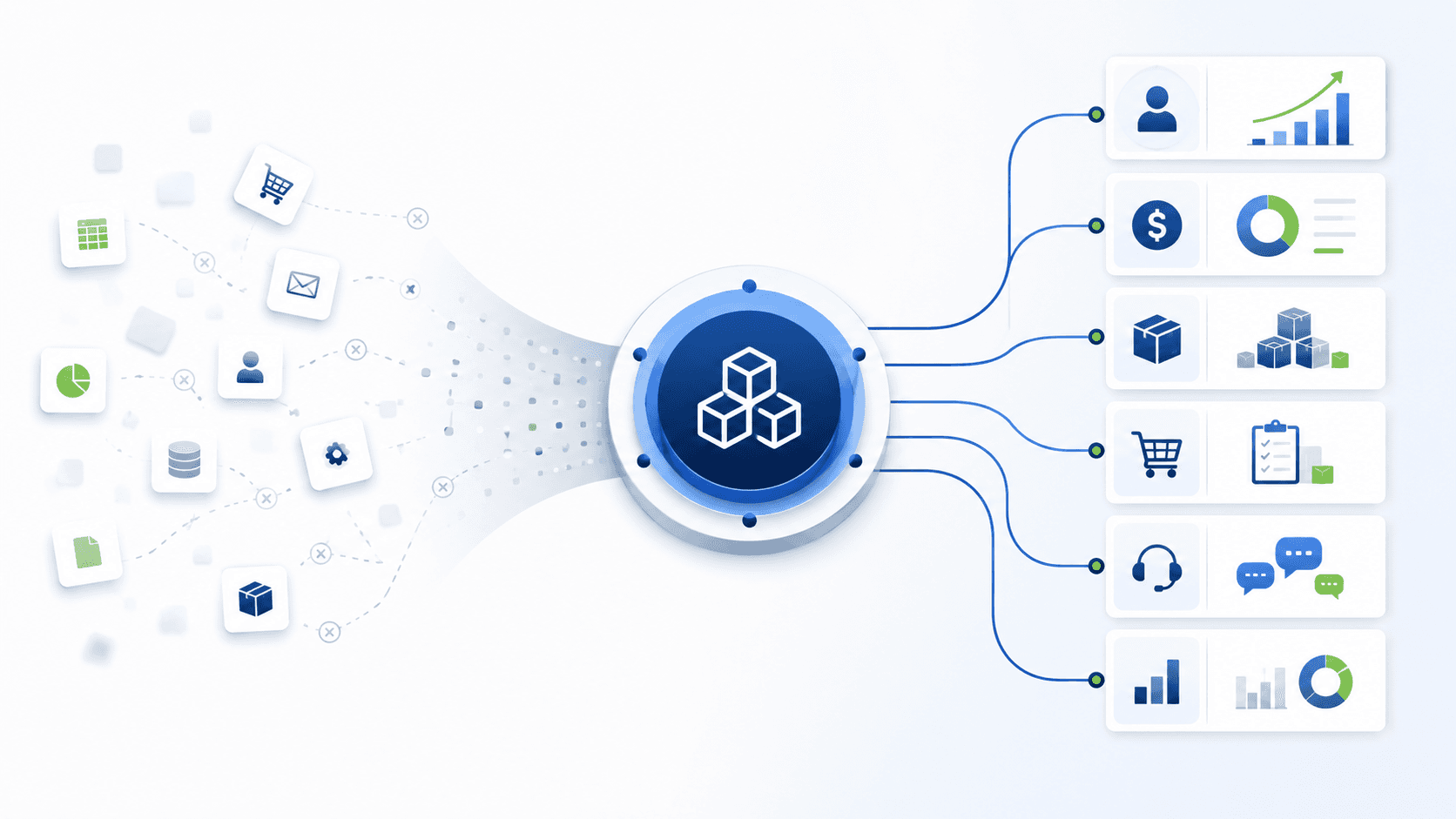
Most growing businesses do not set out to create a fragmented technology environment. It happens gradually. A company starts with accounting software, then adds a CRM, an inventory tool, a project platform, a payroll application, an eCommerce store, and a reporting dashboard. Each decision can make sense on its own. Over time, however, the business can end up managing the same customers, products, orders, and financial information in several places.
Integration can help. Connecting systems can reduce duplicate entry, keep important records moving, and provide a practical bridge while teams change how they work. But integration is not always the final answer. Every connection needs ownership, data rules, monitoring, maintenance, and a plan for failures. As the number of applications grows, so does the effort required to keep information accurate and available.
The stronger long-term objective for many businesses is one trusted system of record: a core ERP platform where the operational data behind sales, purchasing, inventory, finance, service, and reporting is managed consistently. This guide explains when integration is the right choice, when consolidation makes more sense, and how to move toward a more connected operating model without trying to replace everything at once.
Why Integration Is Often the First Step
Integration is valuable when it solves a real workflow problem. A business may need online orders to enter its operations system, payment status to reach finance, or shipping updates to return to customer service. In these cases, a well-designed connection can prevent manual re-entry and make the customer experience more reliable.
- A specialized external platform has a capability the business genuinely needs.
- A legacy application cannot be retired immediately because of timing, contracts, compliance, or historical data.
- A phased ERP implementation requires selected data to move between old and new systems during transition.
- A marketplace, carrier, payment provider, or customer-owned platform must remain part of the workflow.
The important distinction is between an integration that supports a deliberate operating model and one that simply keeps an increasingly complicated software stack running. The first creates a controlled bridge. The second can become a permanent workaround.
The Hidden Cost of a Growing Integration Stack
An integration is more than a technical connector. It contains business decisions: which system owns the customer record, when stock should update, how product names are matched, what happens when an invoice is changed, and who resolves an error. Those decisions need to remain correct as processes, teams, applications, and regulations change.
- Data conflicts: Two systems can both be edited, leaving teams unsure which value is correct.
- Reporting delays: Leaders wait for exports, reconciliations, or manual checks before they can trust performance data.
- Maintenance work: API changes, duplicate records, connector upgrades, and failed syncs consume internal or external support time.
- Process gaps: One workflow may be automated while exceptions still depend on spreadsheets, email, or tribal knowledge.
- Security and access complexity: More systems mean more user accounts, permissions, vendors, and places where sensitive data is stored.
- Higher total cost: Individual subscriptions may look manageable, while their combined license, support, training, and integration costs become significant.
Integration vs. Consolidation: A Practical Decision Framework
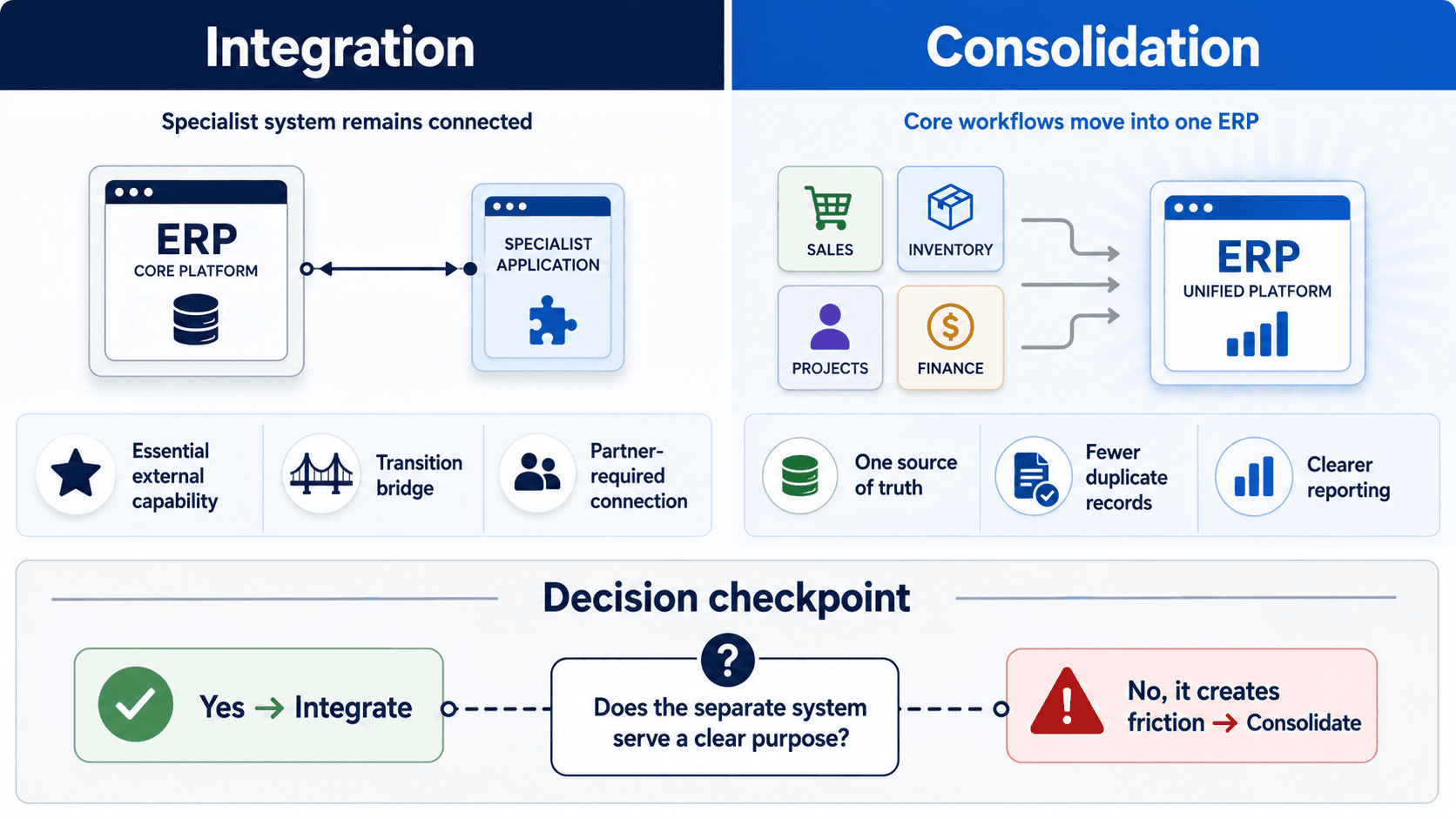
The right question is not, Can these systems be connected? In most cases, they can. The better question is, Should this function continue to live outside the core business platform? The answer depends on business value, operational risk, and the readiness of the organization to change.
Choose integration when
- The external system is purpose-built and materially better for a specialized requirement.
- The data exchange is narrow, clear, and easy to govern.
- The system is required by customers, suppliers, marketplaces, carriers, banks, or compliance processes.
- The business is in a planned transition period and needs a reliable bridge to the new platform.
Choose consolidation when
- Multiple teams maintain the same customer, product, order, or financial data in separate applications.
- The business relies on spreadsheets to reconcile information or produce management reports.
- A department uses a standalone tool for a core workflow that the ERP can support effectively.
- Integrations have become difficult to monitor, expensive to maintain, or vulnerable to errors.
- Leaders cannot see sales, operations, inventory, service, and finance performance in one timely view.
What a System of Record Changes
A system of record is the trusted place where a business maintains the operational data that other teams depend on. It does not mean every application disappears. It means the company defines a clear owner for each important type of information and prevents the same record from being independently managed across several systems.
For example, an ERP can become the operational home for customer accounts, product details, quotations, sales orders, purchase orders, inventory transactions, invoices, and financial records. A connected shipping carrier or payment provider may still exchange information with the ERP, but the ERP remains the central platform for running and reporting on the process.
This improves more than data cleanliness. It gives teams a shared view of the business, makes responsibilities clearer, and reduces the effort spent reconciling one department's version of events with another's.
How Odoo Supports a Consolidation Strategy
For growing businesses, Odoo can provide a practical foundation for this approach. Its integrated business applications can support functions such as CRM, sales, purchasing, inventory, manufacturing, accounting, projects, field service, eCommerce, marketing, and HR. This lets a company bring more of its core operating workflows into one environment while retaining integrations where they are genuinely necessary.
The goal is not to force every business into the same configuration. A manufacturing company, a warehouse operator, and a professional-services firm will each have different priorities. The objective is to identify which applications create silos, which workflows can be unified, and where a specialist platform still provides value.
eBusiness Solutions helps businesses evaluate that fit, map current processes, and create a phased Odoo implementation plan. The recommendation should follow the business requirement: consolidate the functions that benefit from shared data and keep only the integrations that serve a clear strategic purpose.
A Phased Roadmap to Reduce Application Sprawl
Consolidation does not need to be an all-at-once replacement project. A phased approach reduces operational risk and gives users time to adopt new workflows.
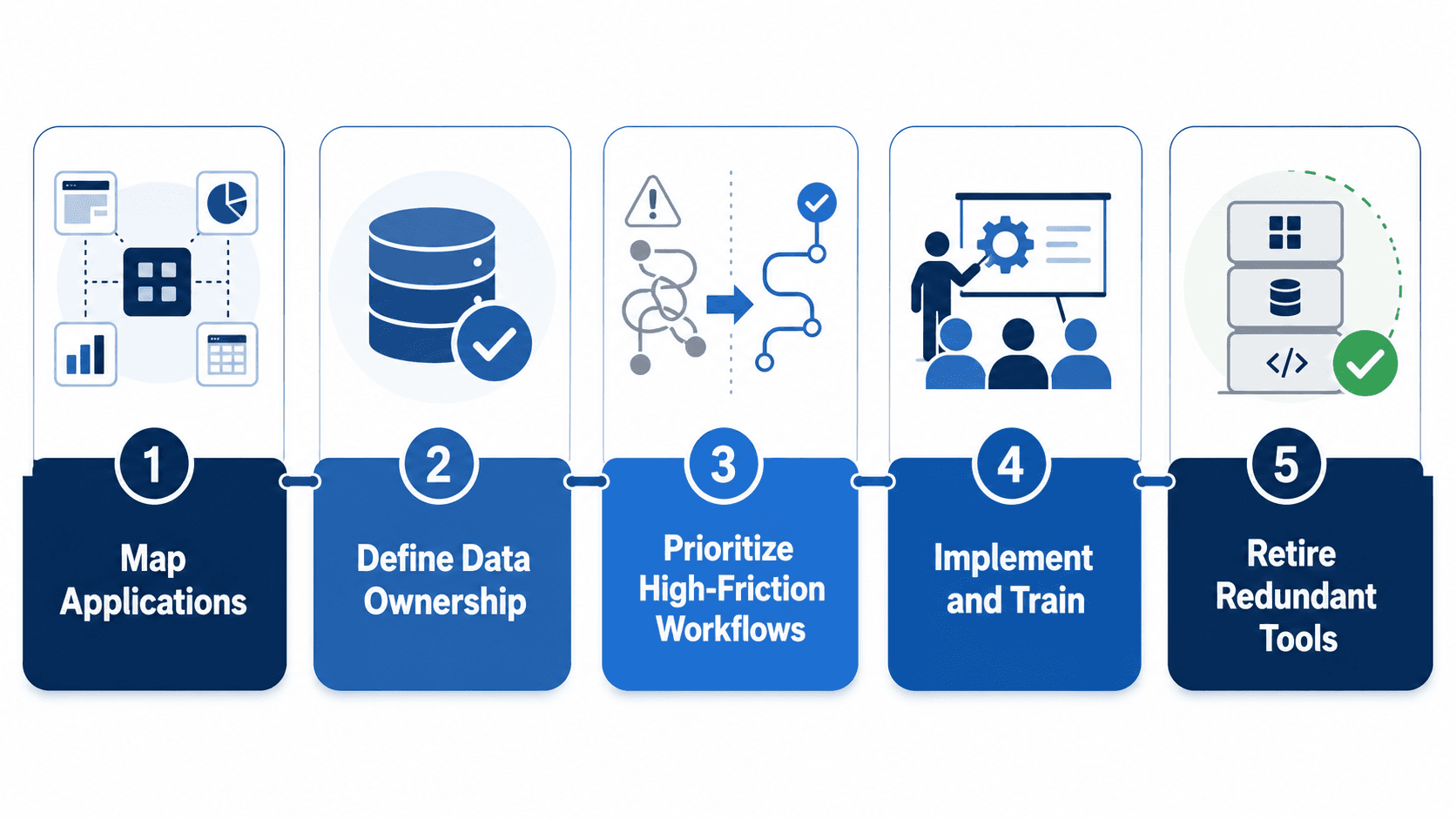
- Map the current application landscape: List each application, the process it supports, the data it owns, its users, integration points, cost, and known pain points.
- Define the source of truth for critical data: Decide where customer, product, pricing, supplier, inventory, order, invoice, and employee data should be maintained.
- Prioritize high-friction workflows: Start with processes that generate repeated manual work, reporting delays, revenue leakage, stock inaccuracies, or poor customer experiences.
- Implement, test, and train by phase: Configure the core workflow, clean and migrate the relevant data, test real scenarios, and train the users who will run the process.
- Retire redundant tools deliberately: Define a cutover plan, archive what must be retained, confirm reporting and controls, and remove the duplicate operating process.
Questions to Ask Before Adding Another Integration
- Could the ERP support this workflow without another application?
- Which system will be the source of truth for each data object?
- What will this connection cost to implement, monitor, support, and upgrade over three years?
- What happens if the sync fails, records conflict, or one vendor changes its API?
- Will the integration improve the process, or is it preserving a workflow that should be redesigned?
- Can this be treated as a short-term transition bridge with a defined end state?
Build for Clarity, Not More Connections
Integration has an important place in a modern technology environment. It can connect essential partners, extend a core system, and support a well-managed transition. But every new connection also adds a responsibility that grows over time.
For businesses dealing with fragmented data, duplicate entry, and delayed reporting, the strategic objective should be a simpler operating model: a clear system of record, fewer unnecessary handoffs, and a shared view of the business. Odoo can provide that foundation for organizations whose requirements align with its integrated approach.
If your teams are managing the same information across several applications, eBusiness Solutions can help you assess your current stack, identify consolidation opportunities, and build a phased ERP roadmap.
Ready to explore Odoo ERP?
Talk with eBusiness Solutions about Odoo implementation, customization, migration, integration, and long-term support.
Book an Odoo ERP ConsultationFrequently Asked Questions
Is integration or consolidation better?
Neither is automatically better. Integration is appropriate when an external system has a clear, lasting role. Consolidation is appropriate when multiple applications duplicate core workflows and create data silos, reporting delays, or excessive maintenance.
What does one system of record mean?
It means the business defines one trusted platform as the owner of each important type of operational data. Other tools may receive or send information, but teams do not independently maintain competing versions of the same record.
Do we need to replace every system to use an ERP?
No. A practical ERP strategy identifies which functions should be centralized and which specialist systems should remain connected. Most successful programs are phased rather than all-at-once replacements.
Can Odoo replace multiple business applications?
Odoo includes integrated applications for many business functions. Whether it can replace a specific tool depends on the workflow, industry requirements, existing contracts, compliance needs, and desired user experience. A fit-gap assessment should guide the decision.
Related Articles

Why Sales Leads Go Quiet and How to Build a CRM Follow Up Process
A practical CRM follow-up process gives every open lead a clear owner, next action, and date so promising enquiries do not disappear between inboxes and systems.

Odoo ERP for Multi Location Service Businesses
See how a connected Odoo ERP setup can give multi-location service businesses clearer customer, scheduling, invoicing, and reporting workflows.

What to Know Before Moving Multiple Companies to Odoo
Learn what to share, what to keep separate, and how to plan an Odoo multi-company rollout around the way your businesses work.