
Odoo ERP Integration Services: Connecting CRM, Inventory, Accounting, and Third-Party Tools
Learn how Odoo ERP integration connects CRM, inventory, accounting, eCommerce, and third-party tools to improve data accuracy and operational visibility.
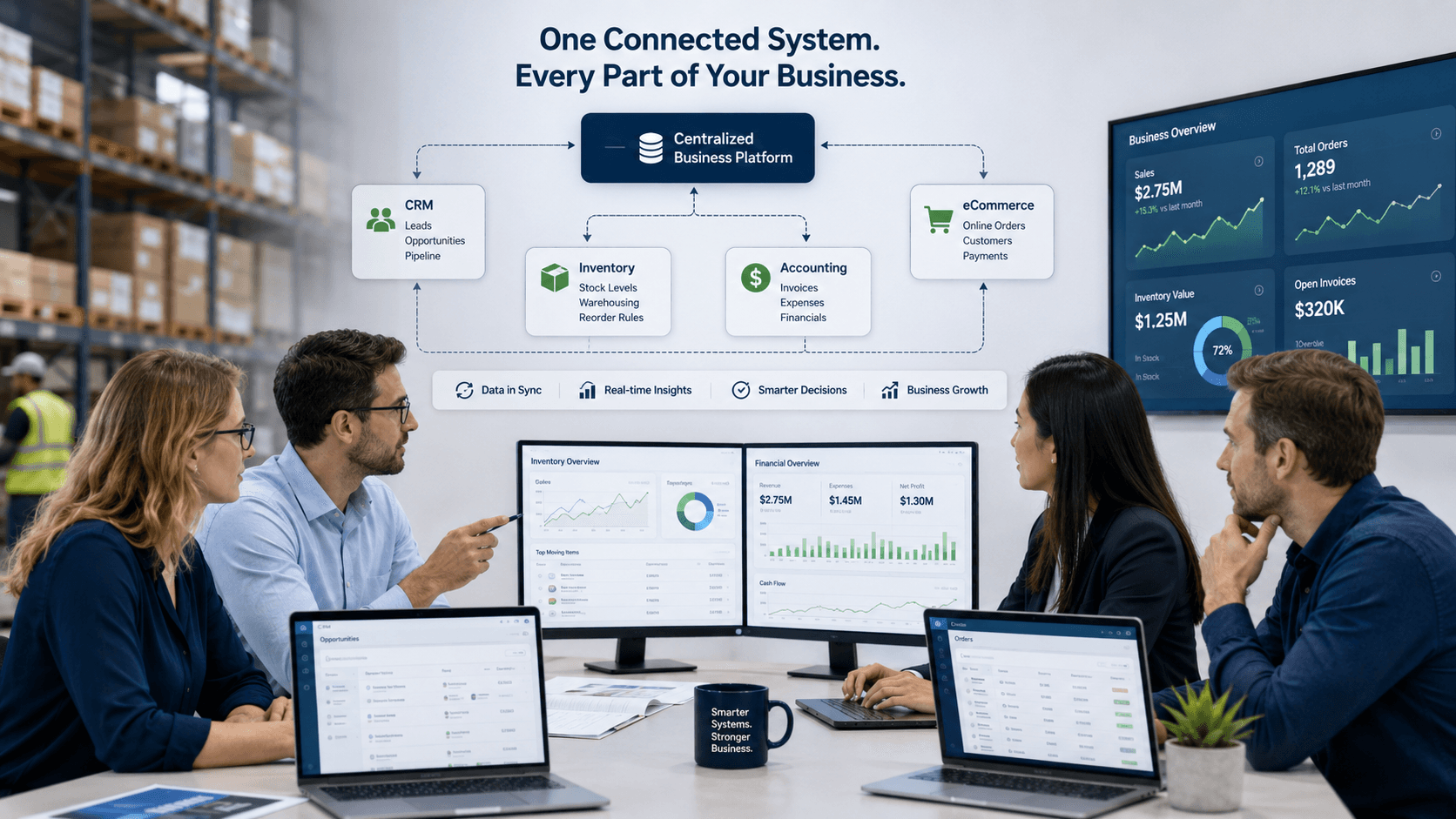
A business can have good software in every department and still struggle to operate as one business. Sales may update the CRM, warehouse teams may manage stock in another system, finance may work in accounting software, and customer orders may arrive through an eCommerce platform. When those systems do not exchange information reliably, employees spend time moving data instead of acting on it.
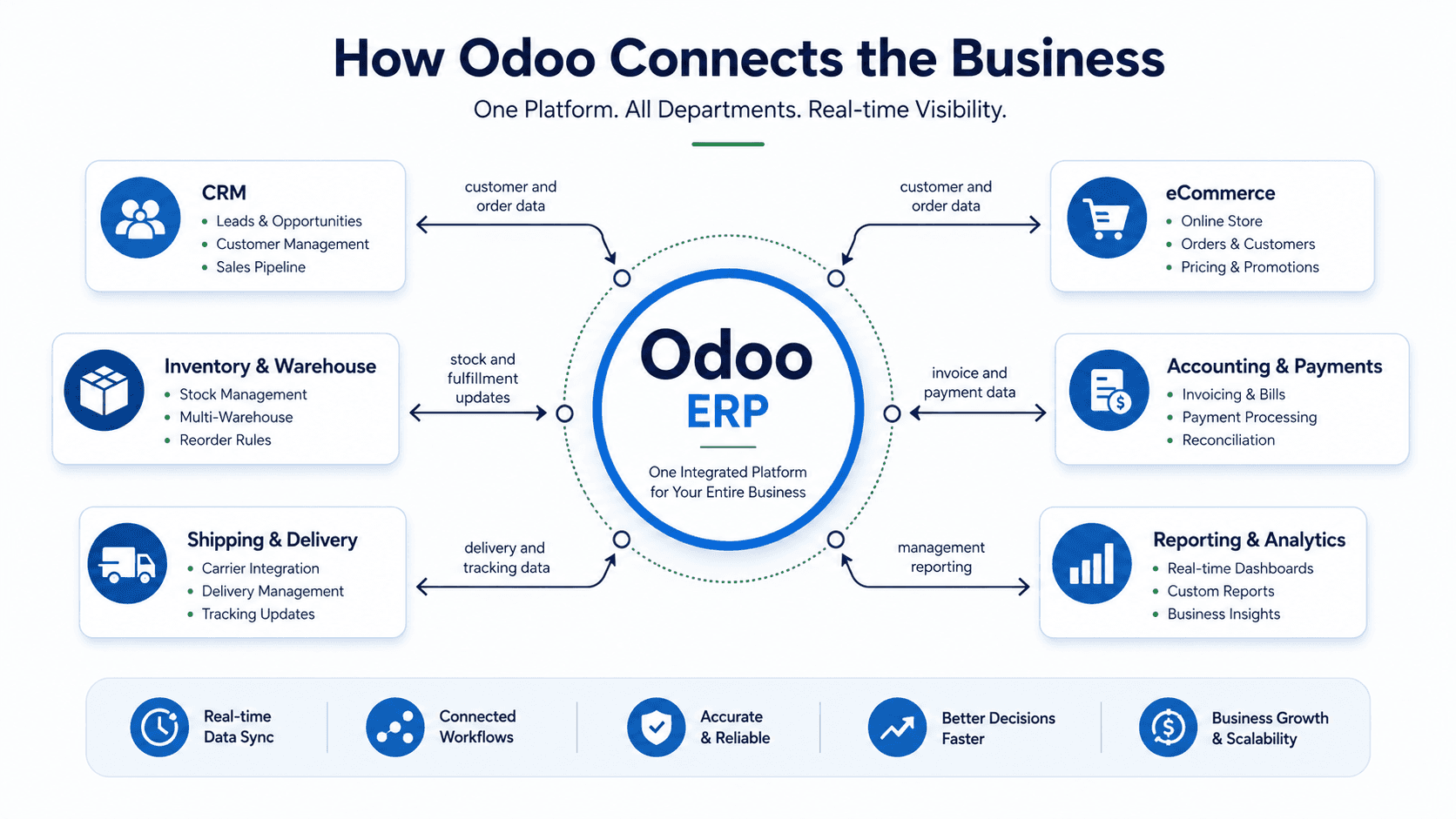
Odoo ERP integration services help connect these business functions so information can move between the systems that teams already use. The aim is not simply to create more connections. It is to create a dependable flow of information between customer activity, orders, inventory, purchasing, invoicing, payments, and reporting.
This guide explains what Odoo ERP integration involves, which systems businesses commonly connect, what to consider before starting an integration project, and how a structured approach can reduce manual work without creating unnecessary complexity.
What Is Odoo ERP Integration?
Odoo ERP integration is the process of connecting Odoo with other applications so that relevant information can be exchanged between them. Depending on the business requirement, an integration may transfer data one way, synchronize data in both directions, or trigger an action in one system when an event occurs in another.
For example, a new customer created on a website or sales platform may need to appear in Odoo CRM. When an order is confirmed, inventory may need to be reserved, the warehouse may need to receive a fulfillment request, and finance may need the information required for invoicing. A well-designed integration makes those transitions consistent and traceable.
The integration itself may use APIs, webhooks, scheduled data transfers, middleware, connectors, or custom development. The right method depends on the systems involved, the required timing, data volume, security requirements, and the level of control the business needs.
Common Odoo ERP Integrations
Every integration project should begin with the business process rather than a list of tools. Still, several integration categories appear frequently in growing companies:
- CRM and sales platforms: Synchronize leads, contacts, opportunities, quotations, customer activity, and order information.
- Inventory and warehouse systems: Connect stock levels, product information, purchase receipts, shipment updates, warehouse locations, and fulfillment status.
- Accounting and payment platforms: Transfer invoices, payments, tax information, refunds, expenses, and reconciliation data while preserving financial controls.
- eCommerce platforms and marketplaces: Bring online orders, customer records, product availability, shipping details, and returns into the operational workflow.
- Shipping and logistics tools: Send delivery requests, tracking information, carrier updates, and proof-of-delivery details between systems.
- Business intelligence and reporting tools: Provide reliable data for dashboards while keeping the operational system as the source of truth.
- HR, project, and service platforms: Connect employee, project, timesheet, support, or service information where it affects billing, capacity, or customer delivery.
Business Benefits of Connecting Odoo
Integration creates value when it improves a real business outcome. The benefits usually come from reducing repeated entry, improving timing, and giving teams a more dependable view of what is happening.
- Less duplicate data entry: Customer, product, order, and payment details can be captured once and reused across the workflow.
- Fewer errors: Automated transfers reduce the risk of incorrect quantities, prices, addresses, invoice details, or status updates.
- Faster order-to-cash cycles: Sales, fulfillment, invoicing, and payment steps can move forward with fewer manual handoffs.
- Better inventory visibility: Teams can make decisions using more current information about stock, purchasing, orders, and deliveries.
- More reliable reporting: Leadership reports are easier to trust when they are based on consistent and connected data.
- A better customer experience: Customers receive more accurate order, delivery, invoice, and support information.
What to Decide Before Starting an Integration Project
An integration should be treated as a business process project, not just a technical connection. Before development begins, the team should agree on several important decisions:
- Which system owns each type of data? For example, should product information be maintained in Odoo, the eCommerce platform, or a product information system?
- Which events should trigger a transfer? Examples include a new customer, confirmed order, payment received, stock change, or shipment created.
- How quickly does the information need to move? Some workflows need real-time updates, while others can use scheduled synchronization.
- What should happen when data is incomplete, duplicated, rejected, or changed in both systems?
- Which data must be protected, logged, or restricted by user role?
- How will the integration be tested, monitored, maintained, and supported after launch?
A Practical Odoo Integration Process
A structured implementation reduces the risk of building a connection that technically works but creates operational problems. A practical process usually includes the following stages.
1. Map the Current Workflow
Document how data moves today, who enters it, which systems are involved, where delays occur, and where teams rely on manual spreadsheets or email follow-ups.
2. Define the Target Workflow
Agree on the desired process, the required data fields, the system of record, the trigger points, and the exceptions that need human review.
3. Choose the Integration Method
Use an existing connector when it meets the requirement and can be maintained reliably. Use APIs, middleware, webhooks, or custom development when the process needs more control or the systems do not have a suitable standard connection.
4. Build and Test in Stages
Start with a focused workflow and test normal cases, missing data, duplicate records, failed transfers, permission rules, and high-volume situations before expanding the scope.
5. Monitor After Launch
An integration needs ownership after go-live. Logs, alerts, retry handling, documentation, and a clear support process help the business identify and correct failures before they affect customers or financial records.
Common Odoo Integration Mistakes to Avoid
- Connecting systems without first deciding which system owns the data.
- Synchronizing every available field instead of only the information the workflow needs.
- Ignoring duplicate records, failed transfers, and partial updates during design.
- Treating a temporary spreadsheet workaround as the long-term integration architecture.
- Launching without user training, monitoring, documentation, and post-launch support.
- Choosing a connector only because it is quick to install without checking its maintenance and upgrade path.
How an Odoo Integration Partner Can Help
An experienced Odoo integration partner can help translate operational requirements into a workable technical design. That includes reviewing the current systems, mapping data ownership, selecting the right integration approach, configuring standard Odoo features, developing custom components where necessary, testing edge cases, and supporting the solution after launch.
The best integration projects are measured by the business process they improve. The connection should help teams work with more accurate information, fewer manual handoffs, and clearer visibility across the organization. It should also remain understandable and maintainable as the business grows.
How eBusiness Solutions Supports Odoo Integration
eBusiness Solutions helps businesses evaluate their current workflows, define integration requirements, configure Odoo, and connect CRM, eCommerce, accounting, inventory, warehouse, reporting, and other business systems. The work can include connector evaluation, API development, custom modules, data mapping, testing, monitoring, and long-term support.
For businesses in Columbus, Ohio, nearby markets, and across the United States, the goal is to create a connected operating environment that supports reliable daily work and remains scalable as transaction volume, locations, teams, and reporting requirements grow.
Final Takeaway
Odoo ERP integration can connect the systems that support sales, customer management, inventory, accounting, fulfillment, and reporting. When the integration is designed around clear business processes, it can reduce duplicate work, improve data accuracy, and give teams faster access to the information they need.
The most effective approach is to begin with the workflow, define data ownership, configure standard Odoo capabilities where they fit, and add integrations or custom development where they create clear value. With the right planning and support, Odoo can become a dependable operational hub rather than another disconnected tool.
Need to connect Odoo with your CRM, accounting platform, eCommerce store, warehouse tools, or other business systems? eBusiness Solutions can help you evaluate your current workflow, plan the integration, and build a solution that supports reliable day-to-day operations.
Ready to explore Odoo ERP?
Talk with eBusiness Solutions about Odoo implementation, customization, migration, integration, and long-term support.
Book an Odoo ERP ConsultationFrequently Asked Questions
Can Odoo integrate with our existing CRM?
In many cases, yes. The right approach depends on the CRM, the required data, the direction of synchronization, and whether a reliable connector or API is available.
Does Odoo integration have to be real time?
No. Real-time synchronization is useful for time-sensitive processes, but scheduled synchronization may be more appropriate for reporting, batch updates, or lower-priority data.
Can Odoo connect with eCommerce and payment systems?
Yes. Integration can connect orders, customers, products, inventory, payments, refunds, shipping, and other information, subject to the capabilities and policies of the systems involved.
Should we use a standard connector or custom integration?
Start by evaluating a standard connector. Custom integration is appropriate when the connector does not support an important business requirement, data rule, security need, or workflow exception.
How do we keep Odoo integrations reliable after launch?
Define ownership, monitor logs and failures, document the data flow, test system updates, and establish a process for handling retries, changes, and support requests.
Related Articles

Odoo ERP for Multi Location Service Businesses
See how a connected Odoo ERP setup can give multi-location service businesses clearer customer, scheduling, invoicing, and reporting workflows.

What to Know Before Moving Multiple Companies to Odoo
Learn what to share, what to keep separate, and how to plan an Odoo multi-company rollout around the way your businesses work.

How Odoo 19 AI Helps Teams Work Faster Without Losing Human Control
Learn how Odoo 19 AI can help operations, finance, and customer-facing teams work faster while people retain control of business decisions.