
Odoo ERP Customization Services: When Standard Modules Need a Better Business Fit
Learn when Odoo ERP customization services help growing businesses adapt workflows, reports, approvals, dashboards, and integrations without over-customizing.

Odoo ERP gives growing businesses a flexible platform for managing sales, CRM, inventory, accounting, purchasing, manufacturing, eCommerce, projects, reporting, and more. For many companies, standard Odoo modules are enough to replace disconnected tools and bring daily operations into one connected system.
But every business has its own workflows, approval rules, reporting needs, customer expectations, and operational edge cases. A process that works for one company may not fit another company without some adjustment. That is where Odoo ERP customization services become important.
The goal of customization is not to make Odoo more complicated. The goal is to make Odoo fit the way the business actually works while keeping the system scalable, maintainable, and easy for users to adopt.
What Odoo ERP Customization Means
Odoo ERP customization means adapting Odoo's standard applications, workflows, views, reports, automations, integrations, and user experience to support specific business requirements. It can be as simple as adding fields and approval steps or as advanced as building custom modules, dashboards, portals, or integrations with third-party systems.
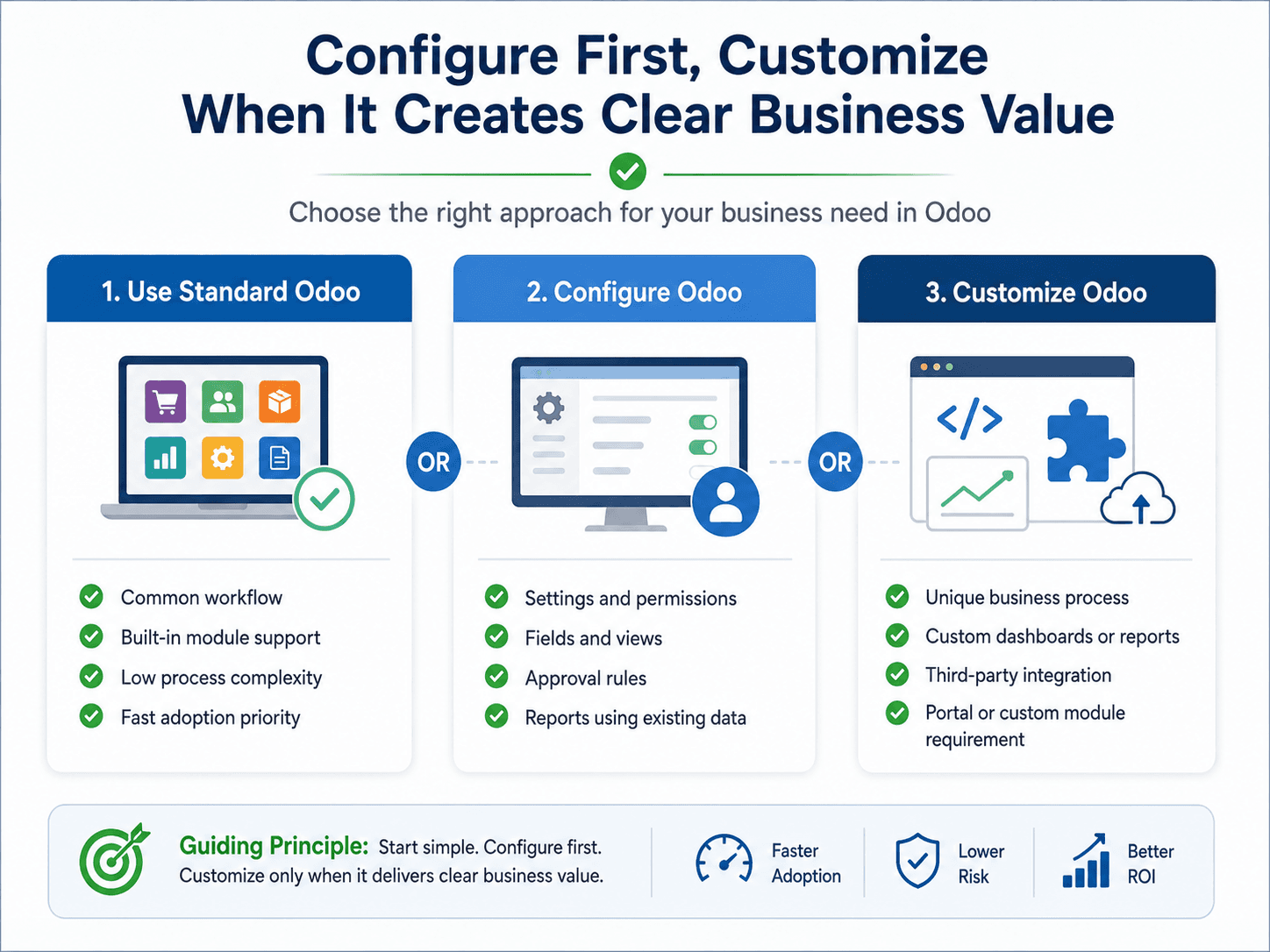
Customization is different from configuration. Configuration uses Odoo's built-in settings, fields, permissions, modules, and workflows. Customization goes further by changing or extending how the system behaves when the standard options do not fully support the business requirement.
A good Odoo implementation partner should not recommend customization for every request. The better approach is to first understand the business process, check what Odoo can already do, configure as much as possible with standard tools, and customize only where the business value is clear.
When Standard Odoo Modules Are Enough
Many businesses can get strong results from Odoo without heavy customization. Standard modules are often enough when the company has straightforward workflows, limited approval complexity, common reporting needs, and processes that can reasonably adapt to Odoo's built-in structure.
For example, a business that needs basic CRM, sales orders, invoicing, inventory tracking, purchasing, and accounting may be able to use Odoo mostly through configuration. In these cases, the focus should be process mapping, setup, user permissions, data migration, training, and adoption rather than custom development.
Using standard features wherever possible keeps the system easier to maintain, easier to upgrade, and easier for users to learn. It also reduces implementation cost and shortens the time to go live.
Signs Your Business May Need Odoo Customization
Customization becomes worth considering when standard workflows cannot support an important business process or when manual workarounds would create more risk than the customization itself.
- Your approval process has multiple steps, departments, limits, or exceptions that standard workflows do not handle cleanly.
- Your team needs reports or dashboards that combine data across sales, inventory, accounting, projects, or operations in a specific way.
- You have industry-specific workflows that cannot be handled with standard module settings alone.
- You need to connect Odoo with third-party tools such as eCommerce platforms, payment systems, shipping providers, CRMs, reporting tools, or legacy applications.
- Your users need simplified screens, role-based views, or custom fields to make daily work faster and less confusing.
- Manual spreadsheet work is still required even after the standard Odoo setup.
- Your business has customer portals, vendor workflows, internal request systems, or self-service needs that require a tailored experience.
Common Examples of Practical Odoo Customization
The best customizations are usually practical. They remove friction, reduce duplicate work, improve visibility, or protect an important operational rule. The goal is not to build something custom for its own sake, but to help the business operate with fewer gaps.
- Custom approval workflows for sales discounts, purchase orders, expense approvals, inventory adjustments, or project changes.
- Custom dashboards for leadership, finance, sales, inventory, warehouse, operations, or customer service teams.
- Custom reports that show margin, stock movement, order status, project profitability, customer activity, or department-level performance.
- Custom fields and forms that capture business-specific information at the right point in the workflow.
- Custom modules for processes that are unique to the company or industry.
- Role-based views that reduce clutter for users and show only the information each team needs.
- Integrations with external systems such as websites, CRMs, payment gateways, shipping tools, HR systems, or business intelligence platforms.
- Customer or vendor portals for order status, document sharing, requests, approvals, or support workflows.
The Risk of Over-Customizing Odoo
Customization can create value, but over-customization can create long-term problems. If every preference becomes a custom feature, the system may become harder to maintain, harder to upgrade, and harder for new users to understand.
Over-customization can also hide deeper process issues. Sometimes the better answer is not a custom feature, but a clearer workflow, better permissions, cleaner data, or a change in how teams use the system.
This is why Odoo customization should be guided by business value. Before building something custom, the team should ask whether the requirement improves speed, accuracy, reporting, customer experience, compliance, or scalability. If the answer is unclear, configuration or process improvement may be the better first step.
A Better Approach: Configure First, Customize Where Needed
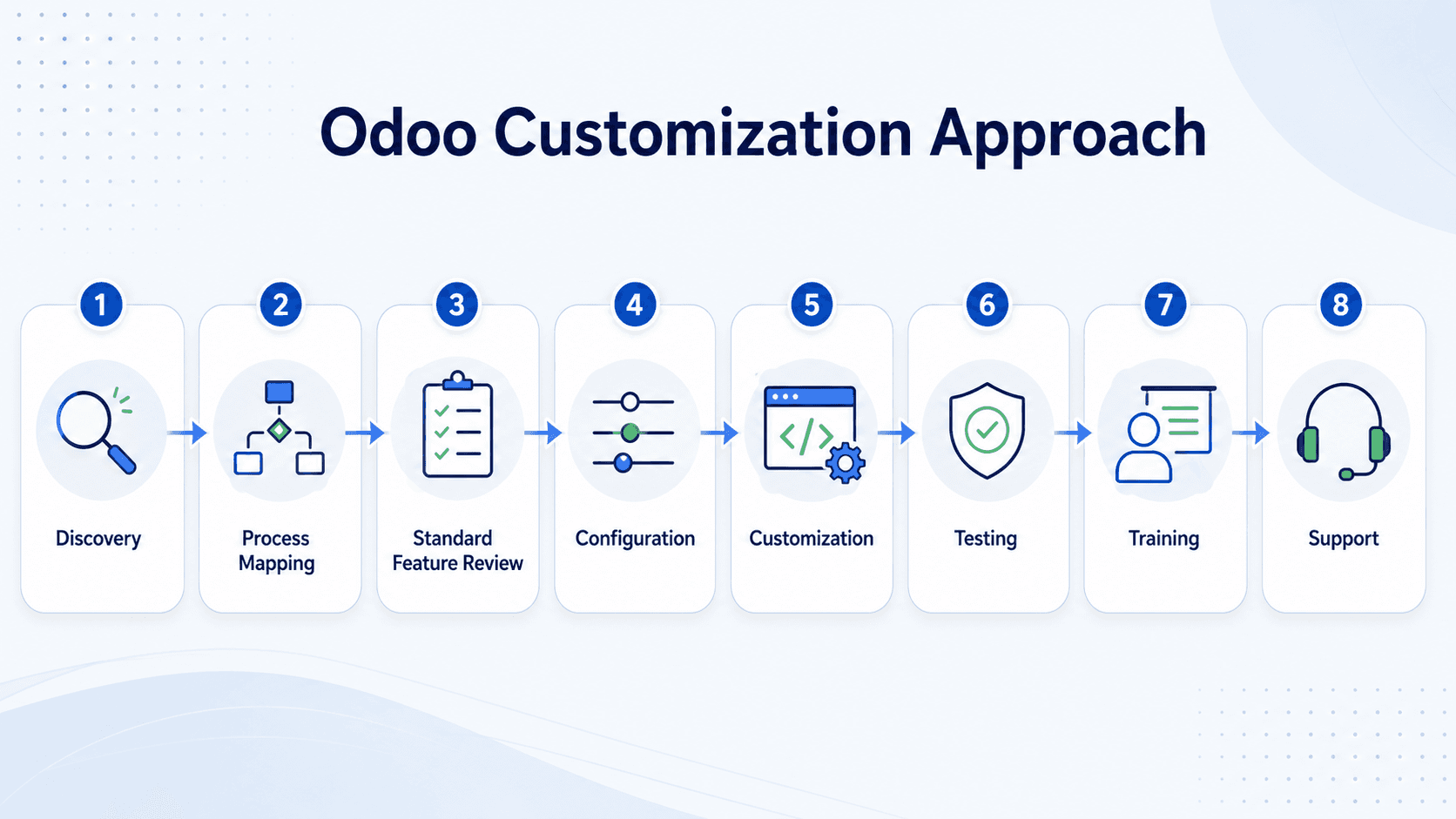
A strong Odoo customization strategy starts with discovery. The implementation team should understand how the business operates today, where teams lose time, where data becomes unreliable, and which workflows are most important to protect.
From there, the team can separate requirements into three groups: standard Odoo features, configuration needs, and true customization needs. This helps prevent unnecessary development while making sure important business processes are not forced into a poor fit.
For growing businesses, this balanced approach is especially important. The company may need a system that works today but can also support more locations, more users, more departments, more reporting needs, and more integrations over time.
How Odoo Customization Supports Growing Businesses
As a business grows, operational complexity increases. Sales may need better visibility into inventory. Finance may need cleaner reporting. Warehouse teams may need faster picking and receiving workflows. Leadership may need dashboards that show the right numbers without waiting for manual spreadsheet updates.
Odoo customization can help connect these needs inside one ERP platform. Instead of asking every team to work around the system, the system can be adapted carefully to support the workflows that matter most.
For businesses in Columbus, Ohio, nearby markets, and across the United States, this flexibility can be especially useful when the company is moving away from spreadsheets, legacy tools, or disconnected software and wants a scalable operating platform.
How eBusiness Solutions Helps with Odoo ERP Customization
eBusiness Solutions supports businesses through Odoo ERP implementation, customization, integration, migration, training, and long-term support. The team helps clients understand where standard Odoo functionality is enough and where customization can create measurable business value.
This includes mapping business processes, identifying gaps, configuring modules, building custom workflows or reports where needed, integrating Odoo with other systems, and helping users adopt the final solution.
Because customization affects both technology and operations, the right partner should bring more than development capability. The partner should understand business workflows, data movement, user adoption, reporting needs, and long-term system maintainability.
Final Takeaway
Odoo ERP customization is most valuable when it helps the system fit important business workflows without making the platform unnecessarily complex. The right customization can improve visibility, reduce manual work, strengthen reporting, simplify user adoption, and support growth.
The key is balance. Use standard Odoo where it fits. Configure where the business needs structure. Customize where the requirement creates clear operational value.
If your business is evaluating Odoo ERP customization, eBusiness Solutions can help you assess your current workflows, identify where customization is truly needed, and build a scalable ERP foundation for the next stage of growth.
Ready to explore Odoo ERP?
Talk with eBusiness Solutions about Odoo implementation, customization, migration, integration, and long-term support.
Book an Odoo ERP ConsultationFrequently Asked Questions
What are Odoo ERP customization services?
Odoo ERP customization services adapt Odoo modules, workflows, reports, dashboards, forms, fields, integrations, or custom modules to support specific business requirements.
Is Odoo customization always necessary?
No. Many businesses can use standard Odoo modules with configuration. Customization should be used when standard options cannot support an important workflow or business requirement.
What is the difference between Odoo configuration and customization?
Configuration uses built-in Odoo settings, modules, permissions, fields, and workflows. Customization changes or extends the system through custom development, custom reports, integrations, or tailored user experiences.
Can Odoo be customized for manufacturing, warehousing, or service businesses?
Yes. Odoo can be customized to support industry-specific workflows, reports, approvals, dashboards, integrations, and operational processes across many types of businesses.
How should a business avoid over-customizing Odoo?
Start with process discovery, use standard functionality where possible, configure before developing custom features, and only customize when there is clear business value.
Related Articles

Odoo ERP for Multi Location Service Businesses
See how a connected Odoo ERP setup can give multi-location service businesses clearer customer, scheduling, invoicing, and reporting workflows.

What to Know Before Moving Multiple Companies to Odoo
Learn what to share, what to keep separate, and how to plan an Odoo multi-company rollout around the way your businesses work.

How Odoo 19 AI Helps Teams Work Faster Without Losing Human Control
Learn how Odoo 19 AI can help operations, finance, and customer-facing teams work faster while people retain control of business decisions.