
Odoo ERP for Multi Location Service Businesses
See how a connected Odoo ERP setup can give multi-location service businesses clearer customer, scheduling, invoicing, and reporting workflows.

A customer calls the location closest to them. The team cannot see the latest service notes because another branch handled the work. Someone calls back later after checking a separate schedule, email thread, and spreadsheet.
For a growing service business, this kind of delay rarely begins with a major system failure. It starts with practical workarounds. One location adopts a scheduling tool. Another tracks jobs in a shared file. Finance invoices from accounting software while managers build their own reports. Each choice may work locally, but leaders lose a clear view as the business adds locations.
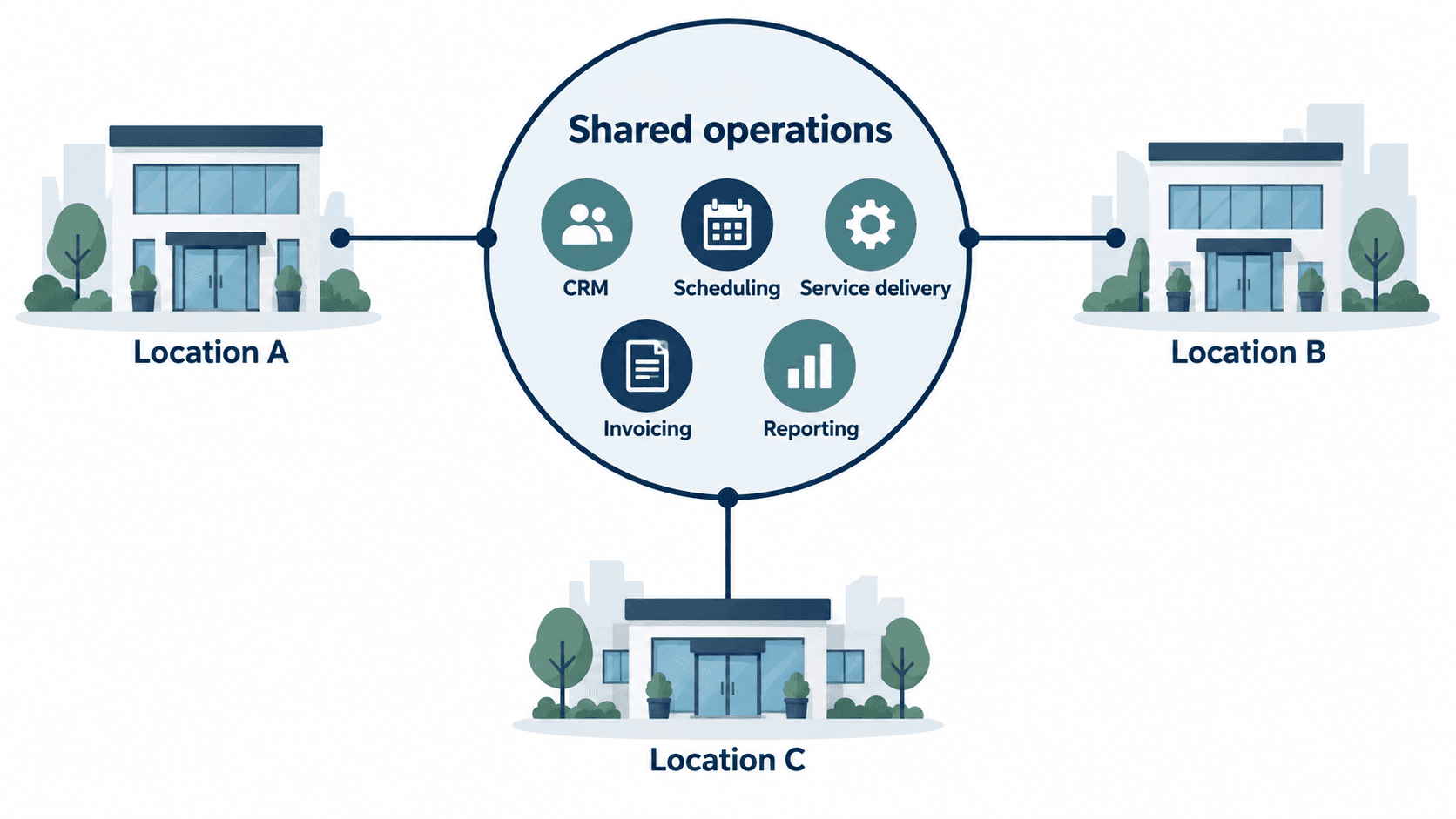
Odoo ERP can give multi-location service businesses a connected way to manage customer activity, scheduling, service delivery, invoicing, and reporting. The purpose is not to make every location work identically. It is to give teams reliable shared information while preserving the local processes that matter.
When separate location systems start creating extra work
The early signs usually appear in ordinary conversations. A manager asks which jobs are incomplete. A customer service representative cannot tell whether a payment is overdue. Finance needs several files to understand revenue by location. A team member enters the same customer information twice because the systems do not share it.
These are not simply software problems. They create delays between the people responsible for selling, scheduling, delivering, and billing work. The more often employees need to call another location, export a file, or check a second system, the harder it becomes to give customers and managers a dependable answer.
Start by tracing one service journey from first inquiry to final invoice. Include the location that receives the inquiry, the person who schedules the work, the employee who delivers it, and the finance team that bills it. This will show where information changes hands and where the same data is entered more than once.
Decide what should be shared across locations
Multi-location businesses need common rules around the information that follows a customer. Customer profiles, service history, product or service definitions, price rules, and reporting measures often need to be consistent. If they vary without a reason, it becomes harder to compare locations or support a customer who works with more than one branch.
At the same time, local teams may need room for different opening hours, territories, service capacity, approval steps, or tax requirements. The planning question is not whether everything should be centralized. It is which information must be common for the business to operate as one company, and which information genuinely belongs to a location.
Bring examples to that decision. Compare two customer records, two service estimates, and two invoices from different locations. Ask which differences are meaningful and which are accidental. This gives an implementation team clear rules to configure and test.
Connect the customer journey from inquiry to invoice
For a service business, a connected system should make the handoffs visible. A new inquiry can become a customer record, an estimate, an appointment or work order, completed service, and an invoice without employees rebuilding the same information at each step.
This does not mean every customer request follows a straight line. A job may need a site visit before pricing. A scheduled service may be rescheduled. A location may need manager approval before work starts. The system should support those real conditions while making the current status easy to find.
When planning Odoo, choose a few high-volume workflows and define what a person should be able to see at each stage. For example, a scheduler may need the assigned employee, location, promised time, and customer notes. Finance may need confirmation that the work was completed before invoicing. A regional manager may need to see unassigned or overdue work across locations.
Give each location useful information without losing the group view
Location managers need information that helps them run the day. They may want today’s appointments, open service requests, staff workload, delayed jobs, and outstanding payments. Owners and regional leaders need a different view: how locations compare, whether service backlogs are growing, and where revenue or workload is changing.
Agree on these reports before building dashboards. Take a current weekly report into the discovery session and identify the decisions it supports. If leadership uses it to decide where to add staff or which location needs attention, the future report needs to answer the same question with timely, trusted information.
Avoid reporting that only looks complete. Test it against recent events. If a job is reassigned to another location or a customer pays an invoice after the weekly report is prepared, ask how the change should appear and who should be able to see it.
Start with one service workflow or one location
A multi-location rollout does not have to begin with every process and every branch. A sensible first phase may focus on new inquiries, scheduling, completed service, and invoicing for one location or one service line. The team can then test the records, permissions, reports, and exceptions before extending the setup.
Choose a starting point with enough day-to-day activity to reveal the real issues. Include the people who answer customer calls, schedule work, complete service, and reconcile the invoice. Give them practical test cases instead of asking whether the system generally works.
- A customer who has used two locations.
- A job that is rescheduled or reassigned.
- Work completed with an exception or additional charge.
- An invoice that needs a correction or credit.
- A manager reviewing location workload at the end of the week.
These tests reveal whether the workflow supports everyday work. They also give the project team a clear list of fixes before the next location is added.
Prepare your people as well as the data
The system can connect records, but people still decide how a service business runs. Before go-live, each location needs a named owner for data preparation, testing, and training. That owner should help identify duplicate customers, outdated service lists, open jobs, and local rules that need to be documented.
Training should use the situations staff will meet in a normal week. A scheduler should create and move an appointment. A service manager should review work that has not been completed. Finance should check an invoice, correction, and payment. A manager should use the report they rely on to run the location.
This work takes time, but it reduces the pressure to solve every issue after launch. It also helps people trust that the new process reflects how the business actually serves customers.
Bring one difficult handoff to the first conversation
You do not need a finished software specification to start. Bring one workflow that becomes difficult when a customer, job, or employee crosses locations. Bring the report that takes too long to prepare. Those examples give an Odoo implementation conversation a practical starting point.
eBusiness Solutions helps businesses plan, configure, migrate, integrate, and train teams for Odoo ERP. Based in Columbus, Ohio, we work with businesses across the United States. If your locations are operating from different customer, scheduling, and finance records, book an Odoo ERP consultation. We will help you assess a practical first rollout.
Ready to explore Odoo ERP?
Talk with eBusiness Solutions about Odoo implementation, customization, migration, integration, and long-term support.
Book an Odoo ERP ConsultationFrequently Asked Questions
Can Odoo ERP support multiple service locations?
Yes. Odoo can provide a connected platform for customer records, scheduling, service delivery, invoicing, reporting, access controls, and other workflows used across locations.
Do all locations need to use the same process in Odoo?
No. A strong implementation defines which information and controls should be consistent while allowing for legitimate local differences such as territories, capacity, opening hours, approvals, and tax requirements.
What is a practical first Odoo rollout for a service business?
Many businesses begin with one high-volume workflow or one location, such as new inquiries through scheduling, completed service, and invoicing. That allows teams to test everyday exceptions before expanding.
What should a multi-location service business prepare before an Odoo project?
Bring one difficult cross-location handoff, examples of customer records and invoices from different locations, a report that takes too long to prepare, and the people who own scheduling, service delivery, finance, data, and training.
Related Articles

What to Know Before Moving Multiple Companies to Odoo
Learn what to share, what to keep separate, and how to plan an Odoo multi-company rollout around the way your businesses work.

How Odoo 19 AI Helps Teams Work Faster Without Losing Human Control
Learn how Odoo 19 AI can help operations, finance, and customer-facing teams work faster while people retain control of business decisions.

Odoo ERP Implementation Timeline: A Phase-by-Phase Planning Guide for Mid-Sized Teams
Understand the typical Odoo ERP implementation phases, from discovery and scope through migration, training, go-live, and continuous improvement.