
What Is Odoo ERP Implementation? A Practical Guide for Growing Ohio Businesses
Learn what Odoo ERP implementation means, why growing Ohio businesses adopt Odoo, and how the right implementation partner can reduce risk and improve ROI.

Growing companies rarely outgrow their ambition. They outgrow the systems that once made the business manageable. A spreadsheet that worked for a ten-person team starts breaking down when sales, inventory, accounting, projects, and purchasing all need the same information at the same time.
Manual follow-ups multiply. Reports arrive late. Leaders spend more time reconciling data than making decisions. That is where enterprise resource planning, or ERP, becomes practical.
ERP software connects the core functions of a business in one shared operating system. Instead of running separate tools for sales, inventory, finance, manufacturing, and customer service, an ERP gives teams a central source of truth.
Odoo ERP has become an attractive option for small and mid-sized businesses because it is modular, flexible, and cost-effective compared with many traditional ERP platforms. For growing Ohio businesses, especially manufacturers, distributors, service companies, and multi-location operators, Odoo ERP implementation can create the foundation for better visibility, cleaner workflows, and scalable operations.
What Is Odoo ERP?
Odoo ERP is a suite of business applications designed to help organizations manage day-to-day operations from one connected platform. The system is modular, which means a company can start with the applications it needs today and add more as the business grows.
Common Odoo modules include CRM, Sales, Inventory, Accounting, Manufacturing, Human Resources, eCommerce, Project Management, Purchase, Helpdesk, and Marketing. These applications are designed to share data, so an update in one area can flow into the next part of the business process.
For example, a sales order can connect to inventory availability, purchasing requirements, delivery workflows, invoicing, and accounting. Instead of five teams manually updating five separate systems, Odoo can support one connected workflow.
Odoo is also known for its open-source roots and flexible architecture. Businesses can choose between Odoo Community, which provides a free open-source foundation, and Odoo Enterprise, which adds broader functionality, support options, and additional features for organizations that need a more complete commercial platform.
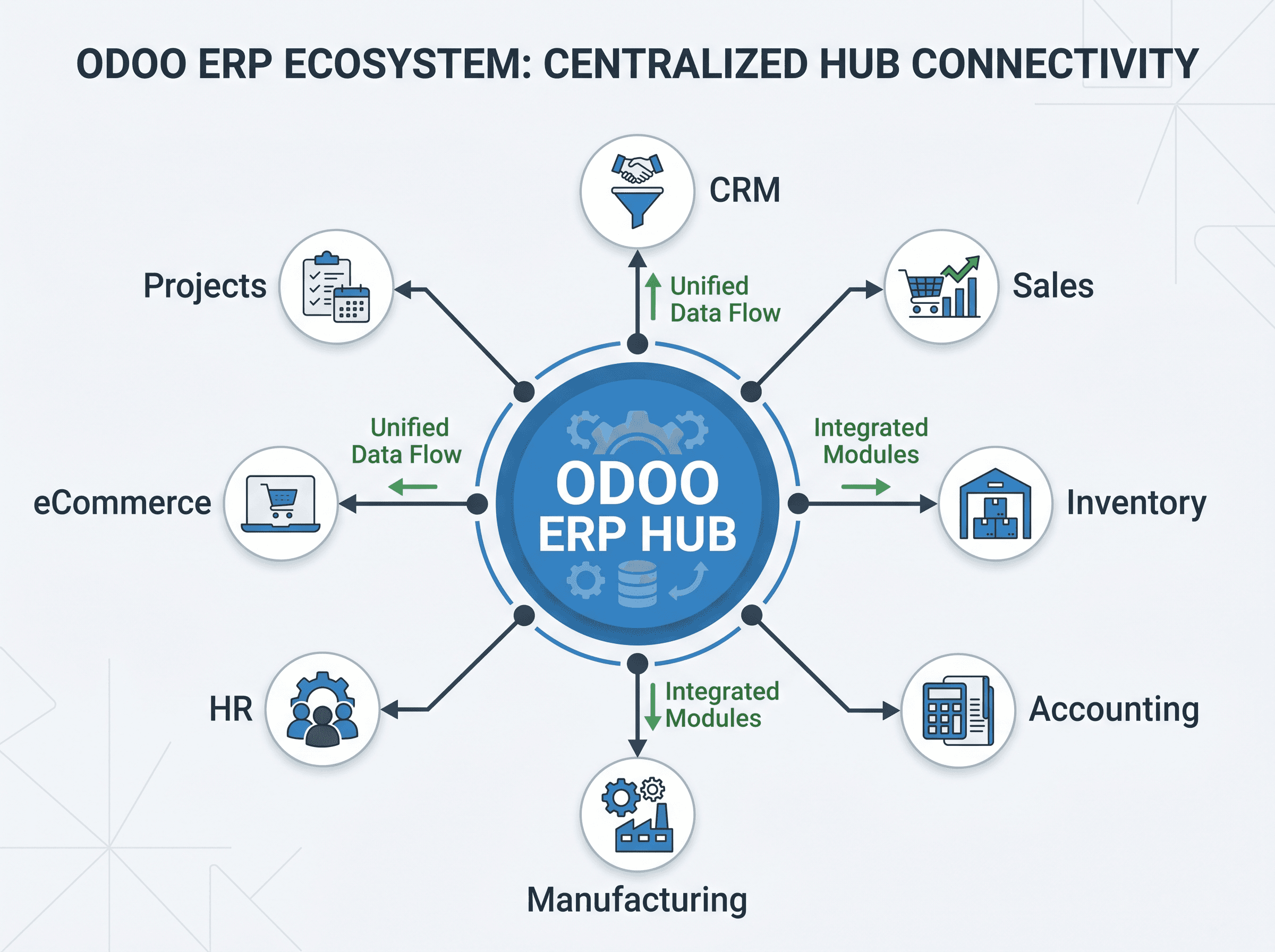
| Odoo area | What it helps manage |
|---|---|
| CRM and Sales | Lead tracking, opportunities, quotations, orders, and customer follow-up. |
| Inventory and Purchase | Stock levels, warehouses, vendors, replenishment, and receiving. |
| Accounting | Invoicing, bills, payments, reporting, and financial visibility. |
| Manufacturing | Bills of materials, work orders, production planning, and shop-floor coordination. |
| Projects and Services | Tasks, timesheets, milestones, service delivery, and team workload. |
| eCommerce | Online product catalog, orders, payments, and integration with back-office operations. |
What Does Odoo ERP Implementation Mean?
Odoo ERP implementation is the process of configuring, customizing, migrating, testing, and launching Odoo so it fits the way a business actually operates. It is much more than installing software.
A successful implementation begins with understanding business requirements. Which workflows are slowing teams down? Which reports are unreliable? Which departments are disconnected? Which manual processes create errors or delays? Once those questions are clear, the implementation team can design Odoo around the organization rather than forcing the organization to guess its way through the software.
Implementation may include selecting the right modules, mapping workflows, setting up user permissions, migrating data from spreadsheets or legacy systems, integrating third-party tools, customizing forms or dashboards, training employees, and supporting the business after launch.
The goal is not simply to move old problems into a new system. The goal is to create a cleaner operating model: fewer duplicate entries, better accountability, faster decisions, and a platform that can grow with the company.
Why Growing Ohio Businesses Are Adopting Odoo ERP
Ohio has a strong base of manufacturing, warehousing, distribution, professional services, and growing technology-enabled businesses. Many of these companies reach a point where disconnected systems start creating operational drag.
A manufacturer may need better production planning and inventory visibility. A distributor may need tighter purchasing, warehouse, and shipping coordination. A services company may need better project profitability reporting. A business with multiple locations may need clearer financial and operational visibility across entities.
Odoo fits this type of growth because it is modular and scalable. A company can begin with CRM, Sales, Inventory, and Accounting, then expand into Manufacturing, Field Service, eCommerce, HR, or custom applications when the need is real.
- Replace scattered spreadsheets with one connected source of operational data.
- Improve visibility across sales, inventory, accounting, purchasing, and fulfillment.
- Reduce manual entry and repetitive administrative work.
- Support multi-location, multi-warehouse, or multi-company operations.
- Build workflows that can evolve as the business expands beyond its current market.
Key Benefits of Odoo ERP Implementation
Centralized Business Operations
Odoo can bring core business functions into one platform, helping teams work from shared records rather than fragmented files. Sales, operations, accounting, and management can all see the same business reality.
Increased Productivity
Automation reduces repetitive work such as duplicate data entry, manual follow-ups, inventory checks, and invoice preparation. Employees can spend more time on higher-value activities.
Better Reporting and Decision Making
Real-time dashboards and structured data help leaders see what is happening across the business. Instead of waiting for manual reports, teams can review sales performance, inventory status, financial trends, and project progress faster.
Improved Customer Experience
When CRM, sales orders, fulfillment, and invoicing are connected, customers receive faster responses and more accurate updates. Teams can track interactions, commitments, and order status in one place.
Scalability for Growth
Odoo allows businesses to add modules and workflows over time. That makes it useful for companies that want to start with immediate needs while building toward a broader digital transformation roadmap.
Cost Efficiency
Because Odoo is modular and customizable, implementation can often be shaped around the company's priorities and budget. The better measure is not just upfront cost, but the return created through improved efficiency, fewer errors, and stronger visibility.
Step-by-Step Odoo ERP Implementation Process
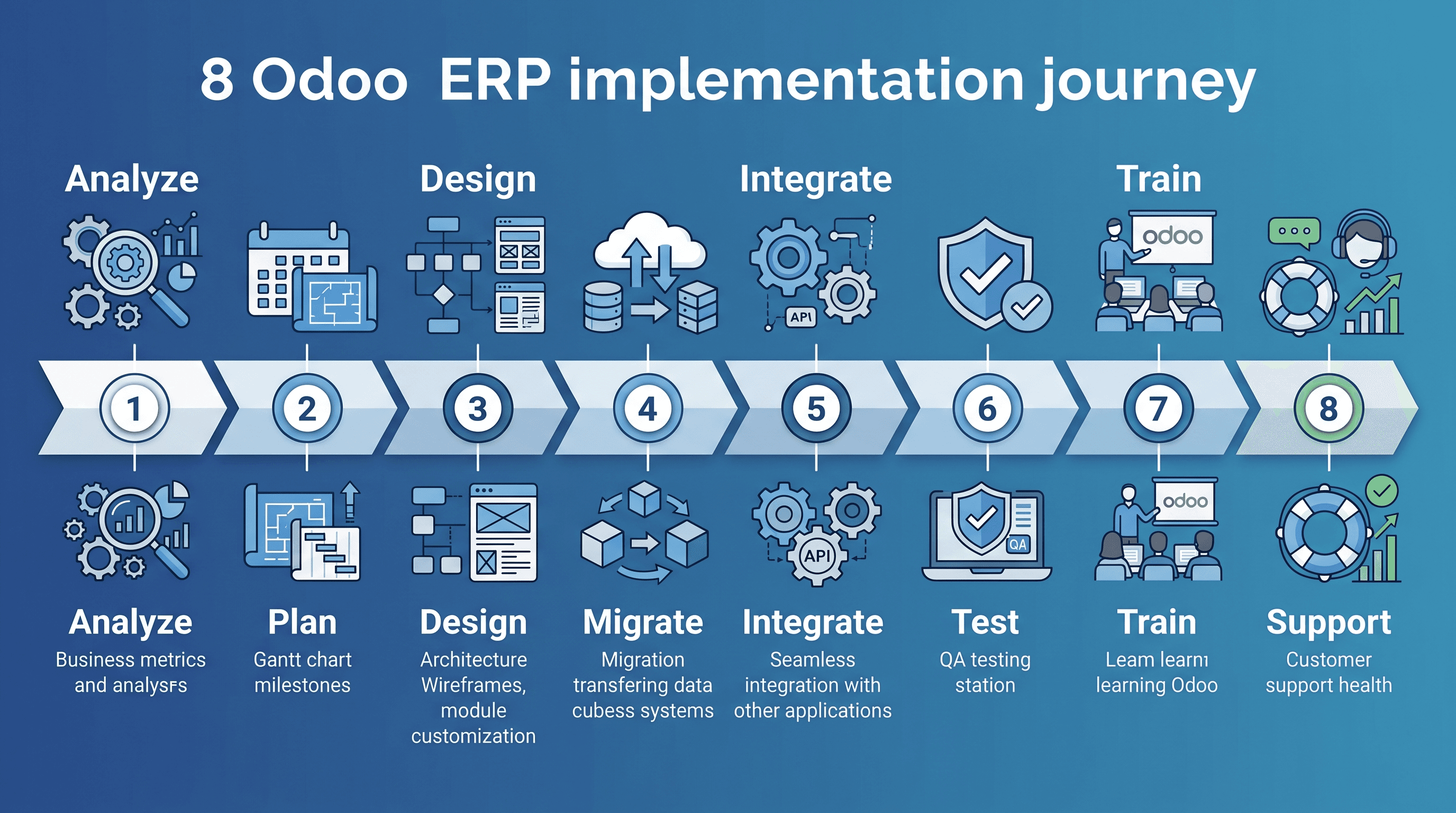
- Business requirement analysis: document workflows, pain points, reporting gaps, approval paths, and operational goals.
- ERP planning and strategy: select modules, define project phases, confirm priorities, estimate budget, and create a realistic timeline.
- System design and customization: configure workflows, fields, forms, permissions, dashboards, and custom features.
- Data migration: clean and import customer, vendor, product, inventory, accounting, and historical data.
- Integration with existing systems: connect Odoo with ecommerce platforms, shipping tools, payment systems, reporting tools, or other software.
- Testing and quality assurance: validate workflows with real scenarios, identify issues, fix bugs, and confirm users can complete daily tasks.
- Employee training: train teams by role so sales, finance, operations, warehouse, leadership, and admin users understand their workflows.
- Go-live and post-implementation support: launch the system, monitor adoption, resolve early issues, and continue optimizing workflows.
Common Challenges During Odoo ERP Implementation
Like any ERP project, Odoo implementation can create challenges if the project is not planned and managed carefully. Most problems are avoidable when the business has the right implementation partner, realistic expectations, and active leadership involvement.
- Resistance to change when teams are not involved early enough.
- Poor planning that leads to unclear scope, missed requirements, or unrealistic timelines.
- Incomplete data migration caused by duplicate, outdated, or inconsistent source data.
- Over-customization that makes the system harder to maintain than necessary.
- Insufficient training that leaves employees unsure how to use the system after go-live.
An experienced Odoo implementation partner helps reduce these risks by balancing business goals, technical configuration, user adoption, and long-term maintainability.
How Long Does Odoo ERP Implementation Take?
The timeline depends on scope. A focused implementation for a smaller business may take several weeks. A mid-sized business with multiple modules, data migration, integrations, and custom workflows may need several months. Enterprise-level or multi-company implementations can take longer, especially when change management and phased rollout planning are required.
| Factor | How it affects timeline |
|---|---|
| Number of modules | More modules mean more configuration, testing, and training. |
| Customization complexity | Custom workflows, reports, and integrations add design and development time. |
| Data migration volume | Large or messy datasets require cleanup, validation, and testing. |
| Team readiness | Projects move faster when stakeholders make decisions quickly and users engage in testing. |
How Much Does Odoo ERP Implementation Cost?
Odoo ERP implementation cost varies based on licensing, configuration, customization, development, hosting, data migration, training, integrations, and ongoing support. A basic implementation with standard modules will cost less than a complex implementation involving manufacturing workflows, ecommerce, third-party integrations, and custom reporting.
Businesses should evaluate cost in terms of return on investment. If Odoo reduces manual work, improves inventory accuracy, accelerates invoicing, and gives leadership better visibility, the value can extend well beyond the initial project.
Choosing the Right Odoo Implementation Partner in Ohio
The implementation partner matters as much as the platform. A strong partner will understand both Odoo and the operational realities of the business. They should be able to translate business processes into system workflows, guide difficult decisions, build custom functionality when needed, and support the company after launch.
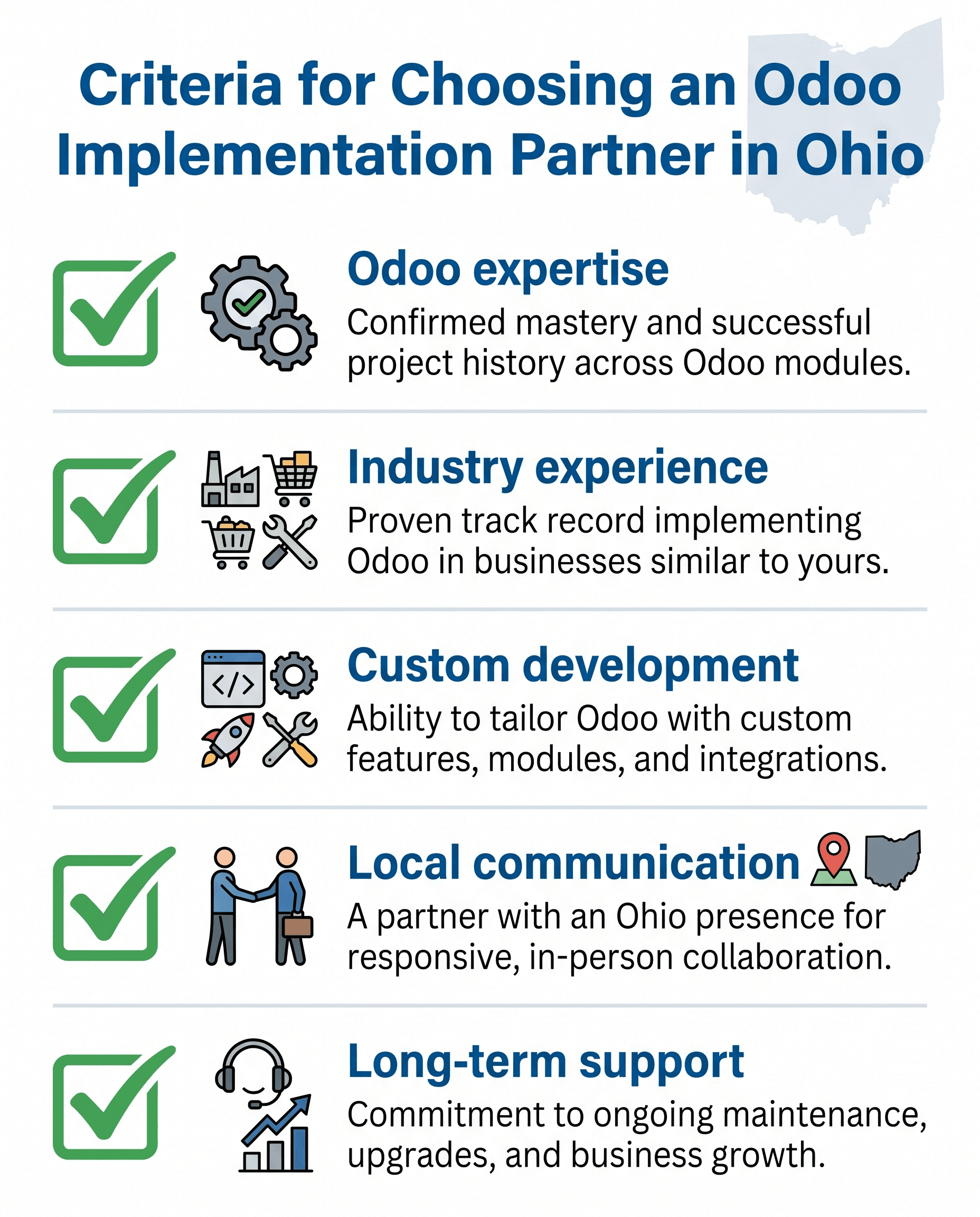
- Do they have hands-on Odoo implementation experience?
- Have they worked with businesses in your industry or a similar operational model?
- Can they support customization, integrations, data migration, and training?
- How do they manage scope, communication, testing, and post-launch support?
- Will they help your team simplify workflows instead of recreating inefficient processes?
Why eBusiness Inc. for Odoo ERP Implementation
eBusiness Inc. helps growing businesses plan, implement, customize, and support Odoo ERP solutions that fit real operational needs. For companies in Columbus, across Ohio, and throughout the United States, the goal is to make ERP practical: aligned to workflows, understood by users, and built for measurable business value.
The team can support end-to-end implementation, including requirements discovery, module selection, configuration, custom development, integrations, data migration, employee training, and post-launch optimization. That combination matters because ERP success depends on both technical execution and business adoption.
Whether a company is replacing spreadsheets, modernizing legacy software, improving inventory control, or preparing for multi-location growth, eBusiness Inc. can help define a clear Odoo ERP roadmap.
Final Thoughts
ERP implementation is a major step, but it does not need to be overwhelming. With the right plan and the right partner, Odoo ERP can help growing businesses centralize operations, automate routine work, improve reporting, and scale with more confidence.
For Ohio businesses facing disconnected tools, manual processes, inventory uncertainty, or limited visibility, Odoo provides a flexible path toward a more connected operating model.
Ready to explore whether Odoo ERP is the right fit for your business? Contact eBusiness Inc. to schedule an ERP assessment or consultation.
Ready to explore Odoo ERP?
Talk with eBusiness Solutions about Odoo implementation, customization, migration, integration, and long-term support.
Book an Odoo ERP ConsultationFrequently Asked Questions
What is Odoo ERP implementation?
Odoo ERP implementation is the process of configuring, customizing, migrating, testing, training, and launching Odoo so it supports a company's specific business operations.
How long does Odoo implementation take?
A focused implementation may take several weeks, while a multi-module implementation for a mid-sized business may take several months. Scope, data quality, integrations, and team readiness all affect timeline.
Is Odoo suitable for small businesses?
Yes. Odoo's modular structure can make it suitable for small and growing businesses because companies can start with the applications they need most and expand over time.
What industries use Odoo ERP?
Odoo is used by manufacturers, distributors, retailers, ecommerce businesses, service companies, professional firms, and organizations with multi-department operations.
How much does Odoo ERP cost?
Cost depends on licensing, modules, customization, data migration, integrations, hosting, training, and support. Businesses should evaluate both upfront cost and expected operational ROI.
Why hire an Odoo implementation partner?
A partner can help define requirements, configure the system correctly, avoid common mistakes, migrate data, train users, and support the business after go-live.
Related Articles

Odoo ERP for Multi Location Service Businesses
See how a connected Odoo ERP setup can give multi-location service businesses clearer customer, scheduling, invoicing, and reporting workflows.

What to Know Before Moving Multiple Companies to Odoo
Learn what to share, what to keep separate, and how to plan an Odoo multi-company rollout around the way your businesses work.

How Odoo 19 AI Helps Teams Work Faster Without Losing Human Control
Learn how Odoo 19 AI can help operations, finance, and customer-facing teams work faster while people retain control of business decisions.